Built-in Plugins in NetBox Enterprise
Pre-integrated NetBox plugins with zero installation complexity, providing enterprise-ready features and official support
NetBox Enterprise includes a curated set of pre-integrated plugins that extend core capabilities without the complexity of manual installation. These plugins are tested, supported, and ready to enable with simple configuration changes.
Applies to both deployment methods
Built-in plugins are available in both Embedded Cluster and Helm deployments. For Helm, enable plugins via netboxEnterprise.spec.netbox.config.customPythonConfig in your values file. See NetBox Configuration for details.
Overview
Built-in plugins provide enterprise-ready features that would normally require manual wheelhouse management. By pre-integrating popular community plugins, NetBox Enterprise simplifies deployment while ensuring compatibility and support.
Key Benefits:
- Zero Installation: No wheelhouse creation or dependency management required
- Pre-tested Compatibility: All plugins verified against the NetBox Enterprise version
- Official Support: Covered under NetBox Enterprise support agreements
- Instant Availability: Enable/disable with configuration changes only
- Automatic Updates: Plugins updated alongside NetBox Enterprise releases
Built-in vs Custom Plugins:
| Feature | Built-in Plugins | Custom Plugins |
|---|---|---|
| Installation | Configuration only | Wheelhouse creation required |
| Compatibility | Pre-tested | Manual verification needed |
| Support | Official support included | Community or vendor support |
| Updates | Automatic with NBE | Manual wheelhouse rebuild |
| Availability | Instant | Requires upload process |
Available Plugins (as of NBE 2.4.0):
The following plugins are included in the current release. Use the Config Name value in your PLUGINS list. NetBox Enterprise manages ten of them itself, from your license and its own settings, and removes them from your PLUGINS list: netbox_branching, netbox_changes, netbox_copilot, netbox_diode_plugin, netbox_assurance_plugin, netbox_enterprise_plugin, netbox_custom_objects, netbox_turbobulk, netbox_asset_lifecycle, and netbox_ndx. netbox_asset_lifecycle and netbox_ndx have their own Admin Console setting, or spec.plugins on Helm. See the notes below the table.
| Plugin | Config Name | Version | Certified |
|---|---|---|---|
| netbox-acls | netbox_acls | 2.1.0 | ☑︎ |
| netbox-bgp | netbox_bgp | 0.20.0 | ☑︎ |
| netbox-documents | netbox_documents | 0.8.5 | ☐ |
| netbox-enterprise-plugin | netbox_enterprise_plugin | 0.2.8 | ☑︎ |
| netbox-floorplan-plugin | netbox_floorplan | 0.10.0 | ☑︎ |
| netbox-interface-synchronization | netbox_interface_synchronization | 4.5.8 | ☐ |
| netbox-inventory | netbox_inventory | 2.6.1 | ☐ |
| netbox-lifecycle | netbox_lifecycle | 1.1.9 | ☐ |
| netbox-ndx-plugin | netbox_ndx | 0.8.0 | ☑︎ |
| netbox-plugin-dns | netbox_dns | 1.5.10 | ☑︎ |
| netbox-qrcode | netbox_qrcode | 1.0.0 | ☑︎ |
| netbox-reorder-rack | netbox_reorder_rack | 1.1.4 | ☑︎ |
| netbox-topology-views | netbox_topology_views | 4.5.1 | ☑︎ |
| netbox-turbobulk | netbox_turbobulk | 0.4.1 | ☑︎ |
| netbox-validity | validity | 3.6.0 | ☐ |
| netboxlabs-diode-netbox-plugin | netbox_diode_plugin | 1.17.0 | ☑︎ |
| netboxlabs-netbox-asset-lifecycle | netbox_asset_lifecycle | 0.3.1 | ☑︎ |
| netboxlabs-netbox-assurance-plugin | netbox_assurance_plugin | 1.6.0 | ☑︎ |
| netboxlabs-netbox-branching | netbox_branching | 1.2.1 | ☑︎ |
| netboxlabs-netbox-changes | netbox_changes | 1.1.3 | ☑︎ |
| netboxlabs-netbox-copilot | netbox_copilot | 1.33.3 | ☑︎ |
| netboxlabs-netbox-custom-objects | netbox_custom_objects | 0.7.0 | ☑︎ |
| slurpit_netbox | slurpit_netbox | 1.4.4 | ☐ |
Plugin versions are updated with each NetBox Enterprise release. For version history, see the NetBox Enterprise Release Notes.
Asset Lifecycle Management conflicts with two plugins in this table
Asset Lifecycle Management (ALM) cannot coexist with netbox_inventory or netbox_lifecycle. If either is in your PLUGINS list, NetBox Enterprise does not enable ALM and reports the conflict on the NetBoxEnterprise resource. NetBox keeps running normally.
ALM is not enabled through the PLUGINS list. It is a Premium feature with its own setting. See Asset Lifecycle Management.
NetBox Data Exchange is also enabled outside the PLUGINS list
NDX (netbox_ndx), new in 2.3.0, comes with all paid NetBox Enterprise licenses and has its own Admin Console setting rather than a PLUGINS entry, and on a connected install it is on by default on a license that carries it. It needs outbound HTTPS to netboxlabs.com, so air-gapped installs start with it off. See NetBox Data Exchange (NDX).
Prerequisites
Before enabling built-in plugins, ensure you have:
- Admin Access: Access to the NetBox Enterprise Admin Console
- Configuration Permissions: Ability to modify NetBox Python Configuration Overrides
- Plugin Documentation: Review the specific plugin's documentation for configuration requirements
- Deployment Window: Time for NetBox pods to restart (typically 2-5 minutes)
No Installation Required
Unlike custom plugins, built-in plugins do not require wheelhouse creation, dependency management, or file uploads. They are already installed in the NetBox Enterprise container.
Enabling Built-in Plugins
Step 1: Access Admin Console
- Navigate to the Config tab in the NetBox Enterprise Admin Console
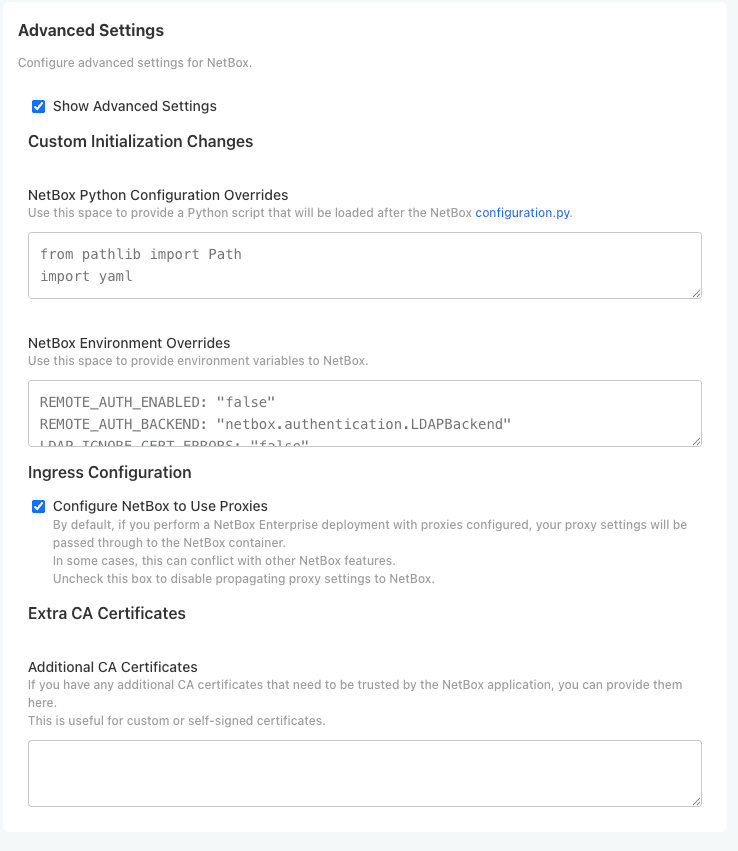
- Scroll down and enable Show Advanced Settings checkbox:
Step 2: Configure Plugins
In the NetBox Python Configuration Overrides field, add your plugin configuration:
Example: Enable multiple plugins
PLUGINS = ['netbox_topology_views', 'netbox_bgp', 'netbox_acls']Example: Enable plugins with configuration
PLUGINS = ['netbox_topology_views', 'netbox_bgp']

PLUGINS_CONFIG = {
    'netbox_topology_views': {
        'allow_coordinates_saving': True,
        'always_save_coordinates': True
    },
    'netbox_bgp': {
        'device_ext_page': 'right'
    }
}
Configuration Reference
Each plugin has specific configuration options. Consult the plugin's documentation on GitHub for available settings:
- NetBox Topology Views
- NetBox BGP
- See Release Notes for links to all built-in plugins
Step 3: Deploy Configuration
- Scroll to the bottom of the Config page
- Click Save config
- When prompted, click Go to updated version
- Click Deploy to apply the configuration changes
The deployment process will:
- Create a new NetBox Enterprise configuration version
- Restart NetBox pods with the updated plugin configuration
- Apply any plugin-specific database migrations
- Return to Ready state when complete (typically 2-5 minutes)
Step 4: Verify Plugin Activation
Once NetBox Enterprise returns to Ready state:
# Check plugin status in the UI
1. Log in to your NetBox instance
2. Navigate to /plugins/ to see the list of installed plugins
3. Verify your enabled plugins appear in the list
Expected Plugin Indicators:
- Plugin appears in the Plugins list at
/plugins/ - Plugin navigation items appear in the NetBox UI navbar
- Plugin-specific pages and features are accessible
- No plugin loading errors in System > Background Jobs
Best Practices
Plugin Selection
- Review Documentation: Always review a plugin's documentation before enabling
- Understand Dependencies: Check if plugins require specific data models or configurations
- Test in Development: Enable plugins in a development environment first
- Start Minimal: Enable only plugins you actively need to reduce complexity
Configuration Management
- Version Control: Track your
PLUGINSandPLUGINS_CONFIGin version control - Document Choices: Document why specific plugins are enabled and their configurations
- Review Regularly: Periodically review enabled plugins and disable unused ones
- Configuration Validation: Test configuration changes in staging before production
Performance Considerations
- Resource Usage: Some plugins add database queries or background jobs
- Monitor Impact: Monitor system performance after enabling new plugins
- Disable Unused: Disable plugins you're not actively using
- Review Updates: Check release notes when upgrading NetBox Enterprise for plugin changes
Troubleshooting
Plugin Doesn't Appear After Deployment
Check:
- Deployment completed successfully and shows Ready state
- Plugin name is spelled correctly in
PLUGINSlist - Plugin name matches exactly (case-sensitive)
- No errors in Background Jobs or system logs
Solutions:
# Check NetBox logs for plugin loading errors
kubectl logs -n <namespace> <netbox-pod-name> | grep -i plugin

# Verify configuration was applied
# Log in to NetBox and check Admin > System > Configuration
Plugin Configuration Not Applied
Check:
PLUGINS_CONFIGdictionary syntax is correct (proper Python formatting)- Plugin name in
PLUGINS_CONFIGmatches name inPLUGINSlist - Configuration keys match plugin's documented options
- Values use correct data types (strings, booleans, integers)
Solutions:
- Review plugin's GitHub repository for correct configuration syntax
- Check Python syntax (commas, quotes, brackets)
- Verify configuration keys match plugin documentation exactly
Database Migration Errors
Problem: Deployment fails with database migration errors
Solutions:
- Check that your NetBox Enterprise version supports the plugin version
- Review Release Notes for known issues
- Contact your NetBox Enterprise support representative if migrations fail
Plugin Causes Performance Issues
Solutions:
- Review plugin documentation for performance tuning options
- Check plugin configuration for settings that reduce query load
- Disable the plugin temporarily to confirm it's the cause
- Review plugin's GitHub issues for known performance problems
- Consider alternative plugins or custom solutions
Additional Resources
- NetBox Enterprise Release Notes - Current list of built-in plugins
- Installing Custom Plugins - Add plugins not included by default
- NetBox Plugin Configuration - General plugin configuration guide
- NetBox Community Plugins - Browse available plugins
Disabling Plugins
To disable a plugin:
- Remove the plugin name from the
PLUGINSlist - Remove any associated
PLUGINS_CONFIGentries (optional but recommended) - Save and deploy the configuration
- The plugin will be deactivated after NetBox restarts
Database Data Retention
Disabling a plugin does not remove its database tables or data. The data remains in the database and will be accessible again if you re-enable the plugin. To completely remove a plugin's data, you would need to manually drop its database tables (not recommended without backup).