GraphQL API
The NetBox Custom Objects plugin exposes custom objects through NetBox's GraphQL
API at the standard /graphql/ endpoint, alongside NetBox's built-in models. For
each Custom Object Type you have defined, two root query fields are generated:
<name>- fetch a single custom object byid.<name>_list- fetch a list of custom objects (paginated).
The <name> is custom_objects_<slug>, where <slug> is the Custom Object
Type's slug with any characters that are not valid in a GraphQL name replaced
by underscores (for example a type with slug dhcp-scope becomes
custom_objects_dhcp_scope and custom_objects_dhcp_scope_list).
The custom_objects_ prefix namespaces these fields so they can never collide
with NetBox's own (or another plugin's) root query fields - every plugin's
GraphQL query is merged into NetBox's single global Query, so a bare,
slug-derived name like site or group would otherwise be shadowed by a core
model's field.
Authentication
GraphQL requests use the same authentication
as the REST API. Pass a v2 token in the Authorization header:
curl -H "Authorization: Bearer nbt_<key>.<token>" \
     -H "Content-Type: application/json" \
     https://netbox/graphql/ \
     --data '{"query": "{ custom_objects_dhcp_scope_list { id display } }"}'
Legacy v1 tokens use Authorization: Token <token> instead.
Object-level permissions are enforced. The top-level <name> / <name>_list
queries only return custom objects the authenticated user has permission to view,
and objects reached through a relationship field are likewise filtered to those
the user may view.
The schema itself includes only the Custom Object Types the user may see: those
they have permission to view, either as a type or through view permission on its
objects. Other types have no queries and don't appear in introspection, and a
relationship field pointing at one returns the generic CustomObjectRelatedObjectType
(id, object_type, display, url) instead of that type's fields.
Using the GraphiQL explorer
NetBox's built-in GraphiQL explorer (at /graphql/) loads the GraphQL schema
once when the page opens and caches it for the life of the page. Because
custom object types and their fields can change at runtime, the explorer's
autocomplete suggestions and Documentation panel can go stale.
If you add, remove, or change a custom object type's fields, or add a new custom object type, while GraphiQL is open, those changes will not appear in the field autocomplete or the Docs panel until GraphiQL re-reads the schema. (The change is already live on the server - a query using the new field works immediately - it is only GraphiQL's cached copy of the schema that lags.)
To refresh it, click the Re-fetch GraphQL schema button - the circular-arrow icon in the GraphiQL toolbar (lower left). This re-reads the schema without reloading the page, so your current query is preserved:
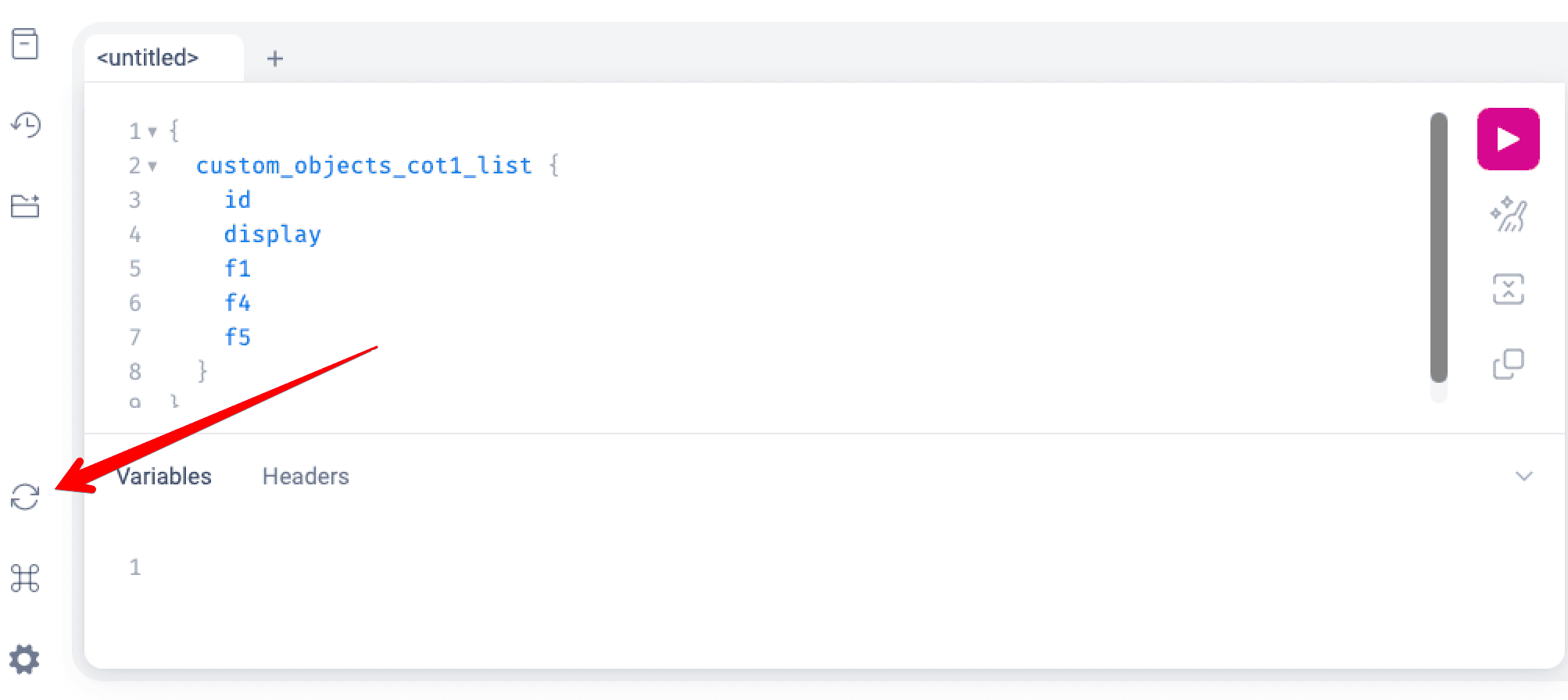
Reloading the whole browser page has the same effect, but discards whatever you have typed in the editor.
This only affects the interactive explorer. Programmatic API clients fetch the schema via introspection whenever they choose, and always query against the current server-side schema.
Querying a list
The fields you can select depend on how the Custom Object Type is defined. Every
type exposes id and display; the examples below also assume the type defines
custom fields named name and description.
query {
  custom_objects_dhcp_scope_list {
    id
    display
    name
    description
  }
}
display is the only human-readable field guaranteed to exist on every
type. It is the object's display name: the type's display expression, else its
primary field's value, else the type's name and the object's ID. name exists
only if the type defines a custom field literally named name.
Filtering a list
<name>_list takes a filters: argument, the same way NetBox's own list
queries do, so filtering happens on the server:
query {
  custom_objects_server_list(
    filters: {
      name: {i_starts_with: "web"}
      cpu_count: {gte: 4}
      primary_site: {slug: {exact: "dc1"}}
    }
  ) {
    id
    name
  }
}
Filters can be combined with AND, OR and NOT, and DISTINCT: true removes
duplicate rows (useful when filtering on a multi-object field). Every type can be
filtered on id, tags, journal_entries, created and last_updated (plus
local_context_data when config context is enabled). Each custom field adds a
filter based on its type:
| Custom field type | Filter | Example |
|---|---|---|
| text, long text, URL, select, color, MAC address | String lookups | name: {i_contains: "web"} |
| integer, decimal | Comparison lookups | cpu_count: {range: {start: 2, end: 8}} |
| boolean | exact / is_null | active: {exact: true} |
| date, datetime | Comparison and date-part lookups | purchased: {year: {exact: 2026}} |
| JSON | Path lookup | data: {path: "env", lookup: {string_lookup: {exact: "prod"}}} |
| multi-select | Array lookups | roles: {overlap: ["edge", "core"]} |
| object | The target's own filter, plus <field>_id | primary_site_id: 7 |
| multi-object | The target's own filter | interfaces: {name: {exact: "eth0"}} |
| polymorphic object | Per allowed type: that type's filter, plus _id | target_dcim_device_id: 7 |
| polymorphic multi-object | Per allowed type: that type's filter | targets_dcim_site: {slug: {exact: "dc1"}} |
| coordinates | <field>_latitude and <field>_longitude comparison lookups | location_latitude: {gte: "40"} |
Object and multi-object fields nest the target type's own filter, whether the
target is a NetBox model (primary_site: {region: {slug: {exact: "emea"}}}) or
another Custom Object Type. A non-polymorphic multi-object field also takes
filters: and pagination: on the field itself, to filter and page the related
objects returned, as long as its target has a GraphQL type (see
Fallback for targets without a GraphQL type).
Polymorphic fields get one filter per type they can point at, named
<field>_<app_label>_<model> as in the REST API, e.g. target_dcim_site and
target_dcim_device for a field target allowing Sites and Devices. Each one only
matches objects pointing at that type.
Nested filters are unavailable for relationships that close a reference cycle.
For single-object relationships, use <field>_id (or, for a polymorphic field,
<field>_<app_label>_<model>_id) instead.
Array fields can't be filtered in GraphQL yet, and are returned as lists (of lists,
for tuples).
A field whose Filter logic is set to Disabled has no filter, as in the REST API.
Lists are paginated with a pagination: argument, as in NetBox's own list
queries, e.g. custom_objects_server_list(pagination: {offset: 0, limit: 50}). See
NetBox's GraphQL pagination documentation
for the options.
Querying a single object
query {
  custom_objects_dhcp_scope(id: 42) {
    id
    display
  }
}
Available fields
Each generated type exposes:
| Field | Description |
|---|---|
id | The object's primary key. |
display | The object's display name (see the tip above). |
class_type | The name of the object's model class, e.g. Table9Model. |
created / last_updated | Change-logging timestamps. |
owner | The object's owner. A custom field named owner takes its place. |
tags | The object's tags. |
journal_entries | The object's journal entries. |
changelog | The object's change records. |
local_context_data / config_context | With config context support enabled: the local context data, and the rendered context (read-only). A custom field named config_context takes its place. |
| One field per custom field | Named exactly as the field's name. Coordinates fields, and the link title of a URL field, aren't available in GraphQL. |
Each Custom Object Type's GraphQL type is named Table<id>ModelType, where <id>
is the Custom Object Type's ID, e.g. Table9ModelType.
Scalar field types
Scalar custom fields map to their natural GraphQL types:
| Custom field type | GraphQL type |
|---|---|
| text, long text, URL, color, MAC address | String |
| integer | Int |
| decimal | Decimal |
| boolean | Boolean |
| date | Date |
| datetime | DateTime |
| JSON | JSON |
| select | CustomObjectChoiceType |
| multi-select | [CustomObjectChoiceType] |
CustomObjectChoiceType has a value (the stored choice value) and a label, as
in the REST API. Filters on select fields still match the stored value.
Relationship field types
Object and multi-object fields resolve to the native GraphQL type of their
target, so a related object is fully traversable exactly as it would be when
queried directly. A field pointing at a Site resolves to NetBox's SiteType:
query {
  custom_objects_server_list {
    name
    primary_site {          # an object (single) field → SiteType
      id
      name
      region { name }       # traverse into the related object's own fields
    }
    interfaces {            # a multi-object (list) field → [InterfaceType]
      id
      name
    }
  }
}
Polymorphic fields
A polymorphic relationship field may point at several different model types. It resolves to a GraphQL union of those types; select fields per type with inline fragments:
query {
  custom_objects_binding_list {
    name
    target {                # polymorphic object field
      ... on SiteType { id site_name: name }
      ... on DeviceType { id device_name: name }
      ... on Table9ModelType { id display }   # a Custom Object Type
    }
  }
}
A field selected in more than one fragment must have the same GraphQL type in each,
or be given a different alias in each. Here a site's name is required (String!)
while a device's can be empty (String), so each fragment aliases it.
Fallback for targets without a GraphQL type
A small number of NetBox models are not exposed in GraphQL. When a relationship
field's target has no native GraphQL type, that field falls back to a uniform
CustomObjectRelatedObjectType so it is never silently dropped:
| Field | Description |
|---|---|
id | The referenced object's primary key. |
object_type | The referenced object's type, as <app_label>.<model>. |
display | The referenced object's display string. |
url | The referenced object's absolute URL, if resolvable. |
Custom Object Type Field Attributes
The following attributes are available when creating or editing a Custom Object Type Field. The deprecation attributes at the end of the table are the except...
Import and Export
Custom objects can be imported and exported in bulk like NetBox's own objects, from the Import and Export buttons on a type's list view.