Technical Information
Version Information
- Application Version: 2.0.0
- ServiceNow Compatibility: Certified for Yokohama, Zurich, and Australia versions.
Table of Contents
- New Tables in ServiceNow
- CI Class Management
- Location Classification
- Tenant Synchronization Configuration
- Data Synchronization - Import
- Data Synchronization - Export
- CI Classification, Identification and Reconciliation
- Logging
New Tables in ServiceNow
The NetBox Labs CMDB Integration application creates several new tables in ServiceNow for staging imported data from NetBox or for other purposes:
Import Set Tables
Import set tables serve as staging areas for data imported from NetBox before transformation and loading into ServiceNow target tables.
| Table Name | Purpose | Key Fields |
|---|---|---|
x_nbl_cmdb_devices_import_set | Staging table for NetBox devices | Device name, serial, asset tag, device type, site, location, status |
x_nbl_cmdb_device_types_import_set | Staging table for NetBox device types | Model, manufacturer, height, weight, specifications |
x_nbl_cmdb_netbox_device_attributes_import | Staging table for NetBox device custom attributes | Device reference, attribute name, attribute value, data type |
x_nbl_cmdb_netbox_sites_import | Staging table for NetBox sites | Site name, description, physical address, contact information |
x_nbl_cmdb_netbox_regions_import | Staging table for NetBox regions | Region name, description, hierarchy |
x_nbl_cmdb_netbox_locations_import | Staging table for NetBox locations | Location name, description, site reference, parent location, hierarchy |
x_nbl_cmdb_netbox_clients_import | Staging table for NetBox tenants/clients | Client name, description, contact details |
x_nbl_cmdb_netbox_departments_imports | Staging table for NetBox departments | Department information and organizational structure |
x_nbl_cmdb_netbox_manufacturers_import | Staging table for NetBox manufacturers | Manufacturer name, description, contact information |
Custom Tables
Custom tables created by the NetBox Labs CMDB Integration application for configuration and data management.
| Table Name | Purpose | Key Fields | Version |
|---|---|---|---|
x_nbl_cmdb_netbox_attributes | Centralized storage for NetBox-specific metadata for ServiceNow records (1:1 by record_sys_id) | record_table, record_sys_id, nb_id, nb_class, nb_sync, nb_ready_exp, nb_ready_msg, sn_location_level |
Application configuration parameters are stored as scoped ServiceNow system properties in sys_properties (managed through All > NetBox > Application parameters - menu categories Export, Import, Synchronization Defaults, System).
Incoming webhook notifications are stored as native ServiceNow events in sysevent (event name x_nbl_cmdb.webhook_received) and processed by a script action.
NetBox Attributes Table:
The x_nbl_cmdb_netbox_attributes table is the central store for NetBox metadata in ServiceNow:
- Purpose: Centralized storage for NetBox-specific metadata associated with ServiceNow records
- Data Model: 1:1 relationship table where each ServiceNow record that requires NetBox integration has ONE corresponding row containing all NetBox-specific attributes
- Scope: Eliminates the need to add NetBox custom fields directly to base ServiceNow tables (cmdb_ci, cmn_location, etc.)
- Key Fields:
record_table: Source ServiceNow table name (e.g., 'cmdb_ci', 'cmn_location')record_sys_id: Reference sys_id of the specific ServiceNow recordnb_id: NetBox correlation ID (unique identifier linking to NetBox object)nb_class: NetBox object class/type (e.g., 'region', 'site', 'location', 'device')nb_sync: Boolean flag indicating if record should be synchronized with NetBoxnb_ready_exp: Boolean flag indicating if record is ready for export to NetBox (read-only)nb_ready_msg: Export readiness validation message (read-only)sn_location_level: Hierarchical level for location records (integer)record_updated: Timestamp of last attribute update
Design Characteristics:
- Each ServiceNow record has at most ONE row in the attributes table
- All NetBox-specific metadata for a record is stored as columns in that single row
- Queries typically use
record_sys_id(unique) and may also userecord_tablefor scoping - Read-only fields are computed by validation logic and should not be manually updated
Migration from v1.x to v2.x:
- v1.x stored NetBox data as fields directly on base tables (
x_nbl_cmdb_netbox_*fields oncmdb_ci,cmn_location, etc.) - v2.x migrates this data to the centralized attributes table during upgrade, creating one attributes row per source record
- Field mappings:
x_nbl_cmdb_netbox_correlation_id→nb_id,x_nbl_cmdb_netbox_synchronize→nb_sync, etc. - Base-table NetBox custom fields are not used by v2.x application logic; the attributes table is the source of truth
- See Upgrading Guide for migration details
CI Class Management
The application provides dynamic CI class management, allowing administrators to register any ServiceNow CI class for NetBox integration without code modifications.
Implementation:
- NetBox Custom Field:
- Custom field
servicenow_ci_classcreated on NetBox Devices - Choice list dynamically populated with registered ServiceNow CI classes
- Field value determines target CI class during import to ServiceNow
- Class Registration System:
- Script Include:
NetBoxClassificationUtilsmanages class registration/deregistration - Configuration UI: Class Management (All > NetBox > Configuration > Class Management)
- Application Parameter:
NetBox Choice Set ID for Classesstores the NetBox custom field choice set ID - Registration Process:
- Select CI classes from ServiceNow CMDB hierarchy
- System automatically creates choice entries in NetBox
- Registered classes synchronized across ServiceNow and NetBox
- Performance: Recommend registering up to 6 classes at a time
- Default Registered Classes:
cmdb_ci_hardware(Hardware)cmdb_ci_server(Server)cmdb_ci_ip_router(IP Router)cmdb_ci_ip_switch(IP Switch)cmdb_ci_ip_firewall(IP Firewall)cmdb_ci_wap_network(Wireless Access Point)cmdb_ci_virtualization_server(Virtualization Server)cmdb_ci_power_eq(Power Equipment)cmdb_ci_facility_hardware(Facility Hardware)
- Device Classification:
- Script Include:
NetBoxDeviceNBvalidates the NetBox custom fieldservicenow_ci_classbefore real-time import proceeds (see Incoming Data - Classification for how this differs from bulk/ETL). - Validation: The field must be set and the value must be a registered CI class (All > NetBox > Configuration > Class Management). Missing or unregistered values fail validation; the import flow is not launched and dependency checks (site, device type, tenant, etc.) are skipped for that pass.
Location Classification
The application provides intelligent location classification to distinguish between NetBox Regions, Sites, and Locations when synchronizing with ServiceNow's unified cmn_location table.
Classification Logic:
Locations are classified as Region, Site, or Location based on multiple factors in the following priority order:
- Explicit
nb_classAttribute (Highest Priority)
- If a location has the
nb_classattribute set in the NetBox Attributes table - Value directly specifies the NetBox type: 'region', 'site', or 'location'
- This explicit classification takes precedence over all other methods
- Attribute can be set during import from NetBox or manually configured
- ServiceNow Location Type Matching
- Compares the ServiceNow Location Type to configured defaults
- Location Type with sequence number below Site default → classified as Region
- Location Type matching Site default sequence → classified as Site
- Location Type with sequence number above Site default → classified as Location
- Hierarchical Position (Fallback Method)
- Analyzes position in ServiceNow location hierarchy
- Locations above a Site in the hierarchy → classified as Region
- Locations below a Site in the hierarchy → classified as Location
- Root-level locations without parents → default to Site classification
Configuration:
- Setup UI: All > NetBox > Configuration > Setup Location Types
- Script Include:
NetBoxLocationNBhandles classification logic - Configure which ServiceNow Location Types map to NetBox Regions, Sites, and Locations
Technical Implementation:
- Location type/class is stored in
x_nbl_cmdb_netbox_attributes.nb_classforcmn_locationrecords - Both versions support hierarchical and Location Type-based classification
- See FAQ - What's the difference between Sites, Regions, and Locations in NetBox? for detailed classification rules
Tenant Synchronization Configuration
The application provides flexible tenant synchronization configuration, allowing control over how NetBox Tenants are imported and exported.
Implementation:
- Configuration UI:
- Setup Page: All > NetBox > Configuration > Setup Tenant Usage
- Script Include:
NetBoxTenantNBhandles tenant classification logic - Data Broker Transforms: Process tenant usage selections and configure parameters
- Configuration Options:
| Option | Import Customers | Import Departments | Export Customers | Export Departments | Tenant Group IDs |
|---|---|---|---|---|---|
| Both | true | true | true | true | MANDATORY - Required to distinguish Customers from Departments |
| Customers only | true | false | true | false | Ignored |
| Departments only | false | true | false | true | Ignored |
| None | false | false | false | false | Not used |
- Tenant Group ID Integration:
- "Both" Configuration: Tenant Group IDs MUST be specified to distinguish which NetBox tenant group contains Customers vs Departments
- "Customers only" / "Departments only": All tenants synchronize as the selected type
- Related Parameters:
Import NetBox CustomersImport NetBox DepartmentsExport NetBox CustomersExport NetBox DepartmentsNetBox Tenant Group ID for Customers(mandatory when "Both", ignored otherwise)NetBox Tenant Group ID for Departments(mandatory when "Both", ignored otherwise)
Data Synchronization - Import
Data may be imported into ServiceNow using one or both of these two methods:
General Architecture
Import and export use different triggers, but the same building blocks - Flow Designer flows, IntegrationHub actions, import sets, and ETL. Use these diagrams as a quick reference when you are tracing where data moves and where failures surface.
NetBox → ServiceNow (Import)
Bulk import pulls object files from NetBox, stages them in import set tables, then transforms and loads them into target tables. Real-time import starts from NetBox webhooks, then uses the same buffering and ETL path for the affected records.
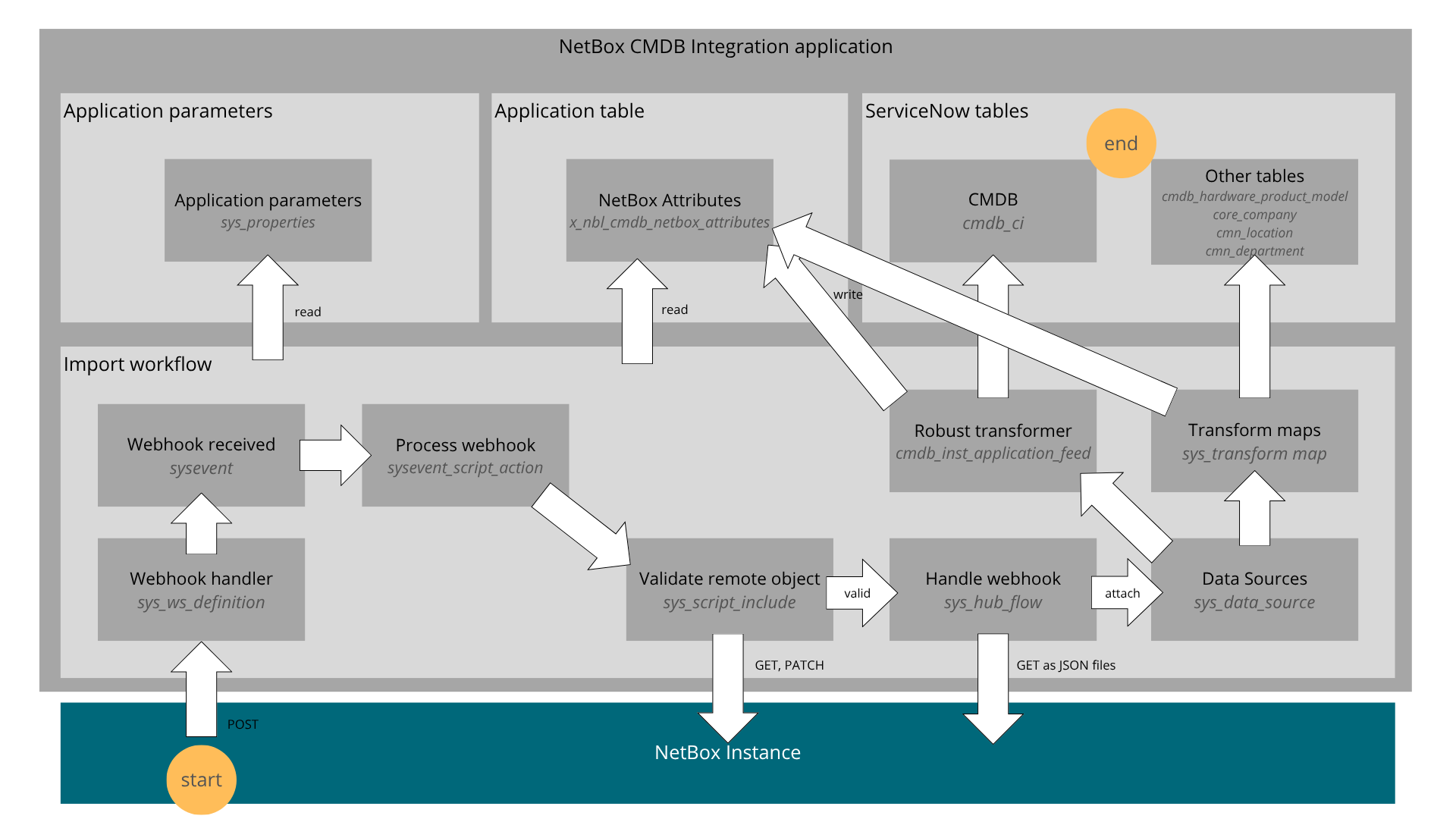
- Bulk Import triggered in ServiceNow using a Flow
- Real-time sync triggered by create, update or delete events in NetBox
Bulk Import from NetBox
Importing data in bulk implies the following sequential actions:
- Trigger the Flow: In Flow Designer, the NetBox Bulk Import flow is triggered manually with the Test function, or on a determined schedule, the latter requiring the activation of the flow (inactive by default)
- Fetching the Data: Data is fetched through flow actions that make use of the NetBox API. A series of queries looking for the ServiceNowSyncTo tags is made, and one data file per object type is fetched. Each file contains all the records for the type. The "Import NetBox [ObjectType]" parameters are honored, so files only get imported if a given parameter for an object type is set to
true. The fetching order is generally from foundation to complex objects so that reference fields can be populated first, for example, manufacturers come before device types so that the manufacturer field for the device type record can be properly referenced in ServiceNow. - Buffering Phase: Incoming data files are attached to the "NetBox Buffer" data source, which has no transform map and serves only as temporary storage. The "NetBox Cycle Buffer" flow runs periodically to move files from the buffer to their destination data source, determined from the files' names.
- Extract, Transform and Load Phase: When reaching their destination data sources, the files are extracted to staging tables, one per object type, and become Import Sets. For non-CMDB objects, a simple transformer checks for the existence of a NetBox Correlation ID or a matching name to identify existing records. For imported devices, a robust transformer is in place to classify CIs and identify existing records through the normal existing IRE process.
Real-time Import from NetBox
When a record is created, updated or deleted on NetBox, the following actions take place:
- NetBox Event Trap and Webhook: The event is trapped by NetBox and triggers a Webhook to the NetBox Labs CMDB Integration application's API in ServiceNow.
- API Responder and Event Notification: In ServiceNow, the application's REST API handler receives the call and fires a
x_nbl_cmdb.webhook_receivedevent on the platformsyseventtable. The event carries the object type, the object's NetBox ID, and a ServiceNow sys_id if found. - Event Processing: The script action
**processNetBoxWebhook** (registered on thex_nbl_cmdb.webhook_receivedevent) validates the NetBox object and its dependencies (for example, a site’s region) are properly tagged and importable. Dependency overlap is coordinated through a short-lived cache backed bysysevent. See Webhook dependency cache. For devices,NetBoxDeviceNBruns first:servicenow_ci_classmust be present and registered (see Incoming Data - Classification). There is no role-name fallback on this path. If validation fails, the object is logged as not valid and is not queued for import. - Fetching the Data, Buffering and ETL: The same flow calls the NetBox API to get all objects that are not already present in ServiceNow. Steps 2, 3 and 4 of the bulk import process are exactly followed, with the exception that the incoming objects are obtained by ID, one at a time, instead of in bulk.
Webhook dependency cache (sysevent)
Real-time import avoids treating the same NetBox dependency as “missing” repeatedly within a short window. Two pieces work together:
- Script action (
processNetBoxWebhook) AftervalidateRemoteObjectsucceeds, the handler calls**addDependenciesToCache**, which enqueues additional**x_nbl_cmdb.webhook_received**platform events with**parm1 = cached**and a small JSON payload (parm2) per missing dependency (NetBox class and ID, target ServiceNow table, and so on). Those rows are stored in**sysevent**and act as markers: “this dependency is already accounted for in this processing wave.”
The script action’s condition**event.parm1 != 'cached'**ensures**cached**events do not re-run the full webhook handler, so synthetic cache events cannot recurse or duplicate the main import logic. **NetBoxBaseNB._inSnOrQueued** All NetBox-side validation classes extend**NetBoxBaseNB**. Its**_inSnOrQueued**method decides whether a given NetBox object is already represented in ServiceNow or already visible in the recent webhook stream. It:
- Looks up the NetBox correlation in
**x_nbl_cmdb_netbox_attributes** (and the underlying record), and - Queries
**sysevent**for recent rows (default five minutes) whose**parm2** contains the same**nbId**/**nbClass**, with**parm1**in**created**,**updated**, or**cached**. If either check hits, the object is treated as already present or already queued, so dependency walks do not keep flagging the same IDs.
Operational note: Because the time window is finite, an object that was cached and then deleted in ServiceNow may not be eligible for immediate re-import until the lookback window has passed. This matches the implementation comment in NetBoxBaseNB.
Duplicate Prevention on CMDB and Non-CMDB Objects
- Incoming CMDB Objects benefit from the same identification and reconciliation rules that are currently available in your ServiceNow installation. Identification of CIs is made on the new NetBox Correlation ID field, but also on the usual fields such as name, asset tag, IP address, etc. No specific reconciliation rules are provided with the application, but they can be added according to your situation if you have a multi-sourced CMDB.
- Incoming Non-CMDB Objects are also matched on the new NetBox Correlation ID field, but also on name if the field is empty, for example on a first sync.
- Outgoing CMDB and Non-CMDB Objects will be rejected by NetBox on their first sync if they violate unicity rules on name, slug or other table-specific fields. This rejection will prompt ServiceNow to fetch the existing object's ID number and to reattempt an update on the record rather than creating a new one.
Data Synchronization - Export
Data is exported from ServiceNow into NetBox using one or both of these two methods:
General Architecture
Bulk export and real-time export run from ServiceNow flows. Records are validated locally, then created, updated, or deleted in NetBox through API calls. Exported devices also carry their ServiceNow class into the servicenow_ci_class custom field to support round-trip synchronization.
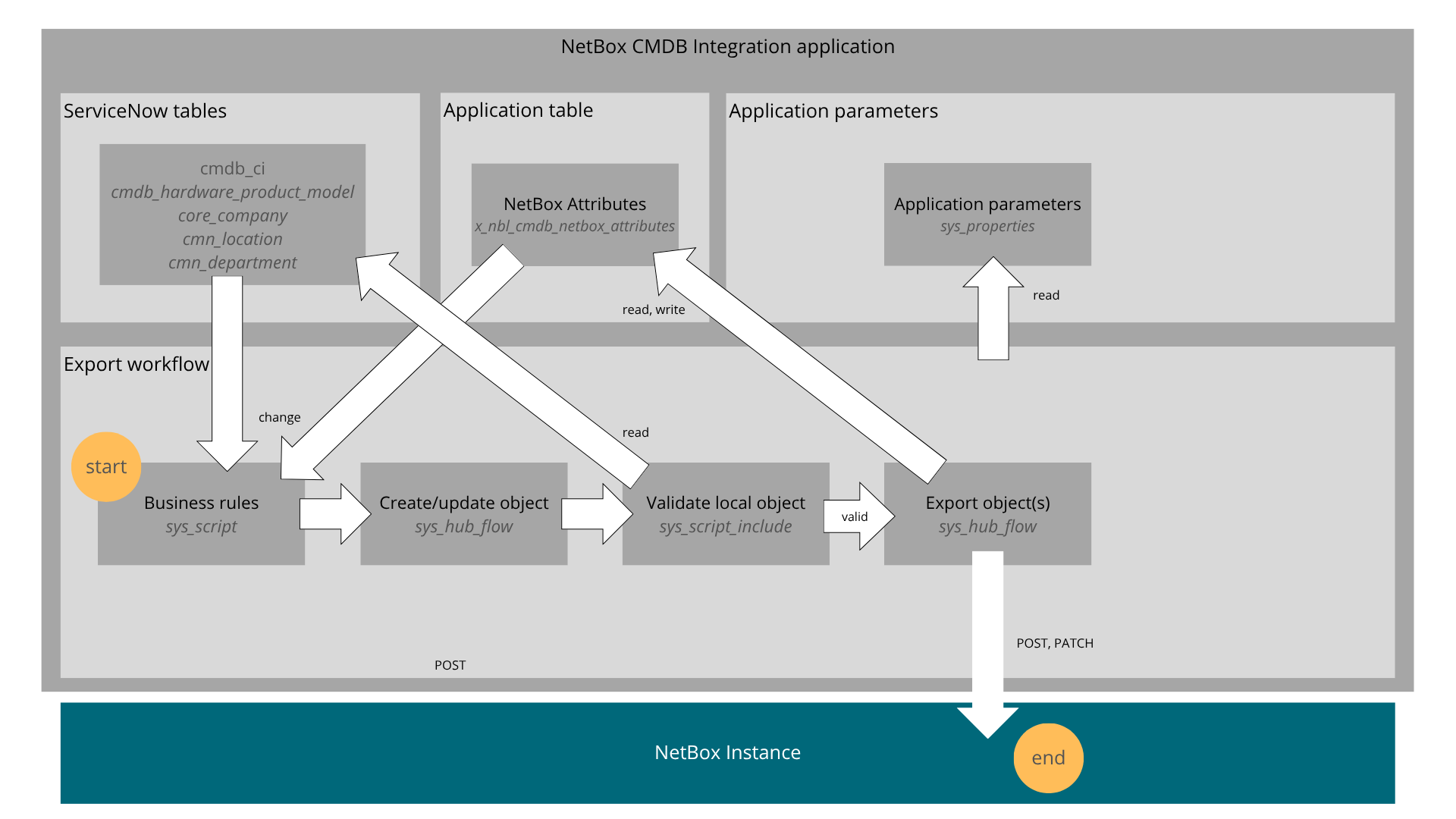
- Bulk Export triggered in ServiceNow using a Flow
- Real-time sync triggered by create, update or delete events in ServiceNow
Bulk Export to NetBox
The process of exporting data in bulk follows these steps:
- Trigger the Flow: In Flow Designer, the NetBox Bulk Export flow is triggered manually with the Test function, or on a determined schedule, the latter requiring the activation of the flow (inactive by default)
- Validating the Devices: Device records meant to be exported are validated by checking that they and all their dependencies are properly marked with the NetBox Synchronize flag. Invalid objects are marked as such and are excluded from the export.
- Exporting the Objects: From foundation to complex objects, objects that are marked with the NetBox Synchronization flag but don't already have a NetBox Correlation ID, meaning that they have never been synchronized, are queried from their respective tables. From there, they are sent (posted) to NetBox through its API, one by one.
Real-time Export to NetBox
When a ServiceNow record is created, updated or deleted, the following actions take place:
- Flow Trigger: One of the NetBox Create/Update [ObjectType] flows gets triggered by the event. According to the event type, it will create (post), update (patch) or delete the same record over on NetBox.
CI Classification, Identification and Reconciliation
Incoming Data
- Classification
How a device is classified depends on which import path runs. The two paths do not use the same rules.
Real-time import (NetBox webhook → processNetBoxWebhook → NetBoxDeviceNB)
**servicenow_ci_classis mandatory**: The NetBox device custom field must be set to a ServiceNow CI class name that is registered in All > NetBox > Configuration > Class Management.- If the field is missing or empty, validation fails (e.g. log: device is missing a value in the ServiceNow CI Class custom field); no import flow is started and no role-based fallback is applied.
- If the value is set but not in the registered set, validation fails with an invalid-class message; again no role fallback.
- Until CI class validation succeeds, dependency validation (site, location, device type, tenant, etc.) is not run for that notification pass.
- This matches the
**NetBoxDeviceNB** script include behavior.
Bulk import and ETL (staging / transform maps / IntegrationHub)
- The Devices pipeline that runs after data is loaded into import set tables can apply custom field classification when
servicenow_ci_classis present. Depending on transformer configuration, it can also apply role-based classification when it is not. - Role-based classification (when implemented in the transformer): keyword match on NetBox device role name or slug maps to a CI class, for example:
| Role Name or Slug Contains | Mapped CI Class | Table name |
|---|---|---|
| router | IP Router | cmdb_ci_ip_router |
| switch | IP Switch | cmdb_ci_ip_switch |
| vsphere | Virtualization Server | cmdb_ci_virtualization_server |
| virtualization-server | Virtualization Server | cmdb_ci_virtualization_server |
| server | Server | cmdb_ci_server |
| wireless-access-point | Wireless Access Point | cmdb_ci_wap_network |
| wap | Wireless Access Point | cmdb_ci_wap_network |
| pdu | Power Equipment | cmdb_ci_power_eq |
| firewall | IP Firewall | cmdb_ci_ip_firewall |
| patch-panel | Facility Hardware | cmdb_ci_facility_hardware |
| (other) | Hardware | cmdb_ci_hardware |
- Role-based rules can be customized by editing the Devices transformer in CMDB Integration Studio Application Data Source (
cmdb_inst_application_feed) or in IntegrationHub ETL.
Treat webhook-driven device import as custom-field-only for classification. Do not assume NetBox role will determine CI class on that path. For bulk device files, consult your configured transformer behavior.
- Identification
- The NetBox Labs CMDB Integration application inserts one identification rule under cmdb_ci_hardware
- It is based on the new NetBox Correlation ID field, a unique record number in NetBox
- It is ordered at 250, usually between the serial number and the name fields
- Other identification rules, either ServiceNow defaults or customized, remain active
- The identification rule can be customized in the CI Class Manager, under table Hardware
- Reconciliation
- No reconciliation rules are added by the application
- The application will adapt to your own rules in a manner that suits your data governance
Outgoing Data
- Classification
CI Class Assignment:
- Exported devices have their CI class automatically populated in NetBox custom field
servicenow_ci_class - Script Include:
NetBoxDeviceSNdetermines CI class fromsys_class_namefield - CI class validated against registered classes before export
- Enables proper round-trip synchronization (export from ServiceNow, import back with correct class)
Role Assignment:
- Generic role ID defined in Application Parameters still used for device role
- ServiceNow classes do not translate to dynamic NetBox roles
- All exported devices assigned the same generic role ID
- See User Guide, Synchronization Defaults (All > NetBox > Application parameters > Synchronization Defaults) for role configuration
Logging
The NetBox Labs CMDB Integration application supports three levels of logging verbosity, adjusted under All > NetBox > Application parameters > System for NetBox Log Level (see User Guide, System):
- Low: logs minimal information
- Medium (default): logs beginning and end of synchronization processes
- High: logs entire synchronization processes
What to look for in the Application Log
Log entries are marked with the process name that generates them to help you filter them:
- Import events
- [NetBox Notification API] Webhooks received from NetBox and Loop avoidance information
- [NetBox Notification Queue Processing] Notifications that come from the API responder into the flow that processes them
- [NetBoxDependencyManager] Dependency checking for a given remote object
- [NetBox[ObjectType]NB] Validation of remote objects (for devices:
[NetBoxDeviceNB]logs missing/invalidservicenow_ci_classandNot validating Device dependencieswhen CI class fails first;[processNetBoxWebhook] ... evaluated as not valid and cannot be importedmeans the import flow was not queued) - [NetBoxBaseNB] At high log level,
_inSnOrQueuedlogs Table and cache hits (attributes table vs. recentsyseventrows) when resolving whether a NetBox ID is already in ServiceNow or the webhook cache; see Webhook dependency cache
- Export events
- [Create/Update NetBox [ObjectType]]: Flows triggered by table events that meet the NetBox conditions
- [NetBox[ObjectType]SN] Validation and dependency checking for local ServiceNow objects
- Other common events
- [NetBoxSetup.rest] REST API calls made from ServiceNow to NetBox with result code
- [NetBoxUtils.*] Various methods for data manipulation, conversion and movement
Where [ObjectType] is one of:
- Region
- Site
- Location
- Manufacturer
- DeviceType
- Customer
- Department
- Device