Troubleshooting
Common issues
-
Jira authentication errors:
401 UnauthorizedSolution: Verify that
JIRA_URL,JIRA_USER, andJIRA_API_TOKENare set correctly in your.envfile. Confirm the API token is active at https://id.atlassian.com/manage-profile/security/api-tokens.JIRA_USERmust be the email address for the Atlassian account that owns the token. -
NetBox authentication errors:
403 ForbiddenSolution: Verify
NETBOX_URLandNETBOX_TOKEN. A read-only token is sufficient. For v2 tokens (NetBox 4.5+), use the formatnbt_YourKey.YourTokeninNETBOX_TOKEN. Confirm the token has not expired and has API access to the object types you are syncing. See Obtain credentials in Getting Started. -
Schema compatibility check fails before sync:
Compatibility check: errors foundSolution: Run a standalone check to see the full report:
docker run --rm --env-file .env quay.io/netboxlabs/netbox-jira-sync:1.0.0 --checkCommon causes and fixes:
- Wrong attribute type (for example Text instead of Textarea): Delete the attribute in Jira Assets and re-run. The tool recreates it with the correct type.
- Object type name mismatch (for example
siteinstead ofSite): Delete the conflicting object type in Jira Assets and re-run. - Label attribute mismatch (for example
nameinstead ofName): Delete the conflicting object type in Jira Assets and re-run.
See Schema compatibility check in Technical Information and Validate schema compatibility in Getting Started.
-
Required custom field reported as empty:
required attribute with an empty or omitted NetBox valueSolution: If the field is managed in Jira rather than NetBox (for example a Jira-managed backlink), exclude it from sync:
SYNC_CF_EXCLUDE=jiraidYou can scope exclusions per object type (
Device:cf_jiraid). Alternatively, delete the attribute in Jira Assets and re-run to recreate it without the required constraint. See Filter custom fields in Getting Started. -
Sync summary shows errors but the log lacks detail:
3 errors on Virtual MachinesSolution: Re-run with
--verbose. Errors are grouped by attribute and error type so repeated failures (for example 233 objects with the same invalid field) appear as one root cause with a count and sample object names:docker run --rm --env-file .env quay.io/netboxlabs/netbox-jira-sync:1.0.0 --verbose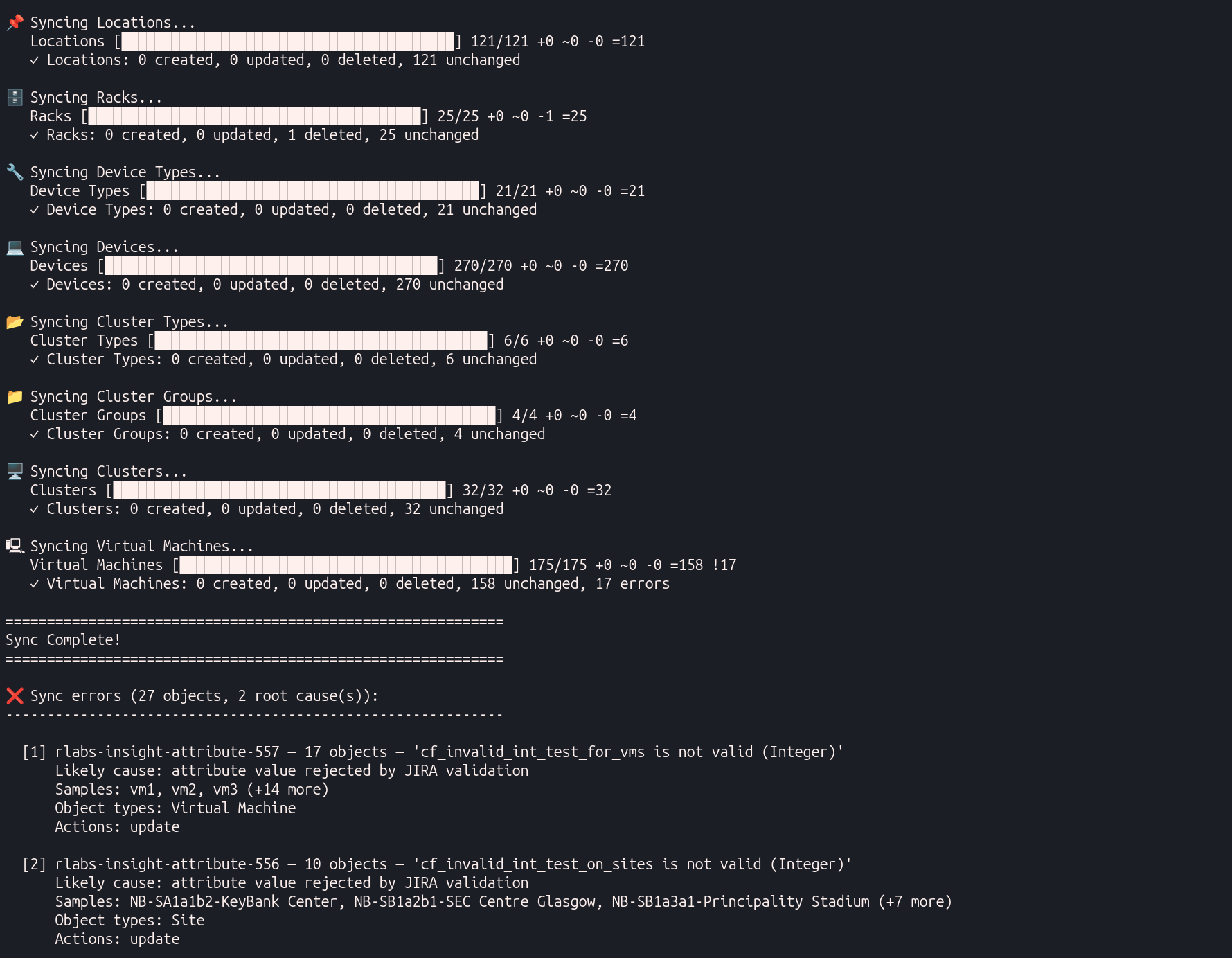
For scheduled runs, combine
--quiet --verboseto suppress the progress bar while still printing the error summary at the end. See CLI flags in Getting Started. -
NetBox connection failures on large object types:
ConnectionError / timeout while fetching InterfacesSolution: Reduce the page size in your
.envfile to fetch smaller payloads per request:NETBOX_PAGE_SIZE=250See
NETBOX_PAGE_SIZEin Technical Information. -
Invalid
SYNC_ASSETSobject type name:Unknown SYNC_ASSETS object type(s)Solution: The sync exits with a list of allowed type names. Object type names are case-insensitive but must match the schema (for example
Device Type, notDeviceType). See SYNC_ASSETS object type names in Technical Information and Limit sync to specific object types in Getting Started. -
Text value exceeds Jira 255-character limit:
may exceed 255 charactersSolution: This appears as a warning during fast checks or an error during thorough checks. NetBox
selectandobjectcustom fields map to Jira Text (255 characters). If the field holds longer values, change the NetBox custom field type totextor exclude it withSYNC_CF_EXCLUDE. If the attribute already exists in Jira as Text but should be Textarea, delete the attribute in Jira Assets and re-run. See NetBox custom field type mapping in Technical Information. -
Registry authentication failure:
unauthorized: authentication requiredSolution: Log in to the NetBox Labs registry before pulling the image:
docker login quay.ioUse the username and token provided by NetBox Labs. See Step 1: Authenticate to the container registry in Getting Started.
Frequently asked questions
Q: Does the integration write data back to NetBox?
A: No. The integration is one-way. Data flows from NetBox to Jira Assets only. No changes are written to NetBox. See Sync behavior in Technical Information.
Q: Will objects be deleted from Jira Assets if they are removed from NetBox?
A: Not by default. Objects deleted in NetBox remain in Jira Assets until you retire them manually. Set GRACE_DAYS_BEFORE_STALE_DELETE to enable automatic deletion of stale objects whose last_synced date exceeds the threshold. Objects still present in the current NetBox fetch are never deleted, regardless of their last_synced value. See Common schema attributes in Technical Information.
Q: What do GRACE_DAYS_BEFORE_STALE_DELETE=0 and =1 mean in practice?
A: The sync compares last_synced as a UTC calendar date (time of day is ignored) against today's UTC date. An object is deleted only when its age in whole days is greater than the threshold, and its netbox_id is not in the current NetBox fetch for that object type.
last_synced date (UTC) | Age (if sync runs today) | Deleted when threshold is 0? | Deleted when threshold is 1? |
|---|---|---|---|
| Today | 0 days | No | No |
| Yesterday | 1 day | Yes | No |
| 2 days ago | 2 days | Yes | Yes |
In short:
0- Delete objects whoselast_syncedis yesterday or earlier. Objects touched today are kept.1- Delete objects whoselast_syncedis two or more calendar days ago. Objects synced today or yesterday are kept.
For any value N, objects with last_synced from today back through N days ago are kept; anything older is eligible for deletion. A threshold of 7 keeps objects synced within the past week (today through seven days ago) and deletes objects whose last_synced is eight or more calendar days ago. See GRACE_DAYS_BEFORE_STALE_DELETE in Technical Information.
Q: Can I make manual changes in Jira Assets?
A: Manual changes to synced attributes are overwritten on the next sync run. Use SYNC_CF_EXCLUDE to prevent the sync from writing fields you manage in Jira (for example a Jira object ID backlink). See Filter custom fields in Getting Started.
Q: Can I sync only specific object types?
A: Yes. Set SYNC_ASSETS to a comma-separated list of object type names. Required reference types (for example Tag, Device) are included automatically. Schema provisioning still creates all object types; only the data sync step is filtered. See Limit sync to specific object types and SYNC_ASSETS object type names.
Q: Can I sync only specific Virtual Machines?
A: Yes. Use the --vm-tags flag with comma-separated NetBox tag slugs. Only VMs with at least one matching tag are synced. VM Interfaces and Virtual Disks for excluded VMs are skipped. All other object types sync in full unless SYNC_ASSETS restricts them. See VM tag filtering in Getting Started.
Q: Can I run the sync against multiple NetBox instances?
A: Yes, by running a separate container instance for each NetBox instance. Each instance needs its own .env file with distinct NETBOX_URL and NETBOX_TOKEN values. All instances can target the same Jira Assets schema or different Jira sites. See Step 3: Create your configuration file in Getting Started.
Q: Why does the first sync take so long?
A: The first run provisions the full Jira Assets schema, runs a thorough compatibility check, and syncs all objects. The Jira Assets API processes approximately 2-3 objects per second. Subsequent runs skip unchanged objects and complete much faster. See Sync behavior in Technical Information.
Q: What is the last_synced attribute used for?
A: The sync tool sets last_synced to the current UTC time whenever it creates or updates an object in Jira Assets. Unchanged objects are not written, so their last_synced value stays at the last time they were created or changed. A stale last_synced date usually means the object was removed from NetBox or has not changed since its last write. Use it to identify candidates for manual retirement, or enable GRACE_DAYS_BEFORE_STALE_DELETE for automatic cleanup. See Common schema attributes.
Q: Why are custom field object references stored as plain text?
A: Jira Assets requires each reference attribute to target a single fixed object type. NetBox object and multiobject custom fields can reference any model, so the integration stores the display value as text rather than a navigable link. See Custom field limitations and Known limitations.
Q: Do I need to create the Jira Assets schema manually?
A: No. On first run, the sync tool creates a schema named NetBox with all 28 object types and their attributes. Run --check before your first production sync to validate compatibility. See Step 4: Validate schema compatibility in Getting Started.
Q: Is Jira Data Center supported?
A: The tool has been tested with Jira Cloud only. Jira Data Center may require modifications. See Supported Jira versions on the overview page.
Q: Which NetBox plugins are supported?
A: The integration syncs object types from the netbox-inventory and netbox-lifecycle plugins (Supplier, Purchase, Delivery, Inventory Asset, Vendor, Support SKU, Support Contract, and related types). These objects must exist in your NetBox instance for their types to sync. See Supported NetBox plugins and the object type mapping table.
Additional resources
Support
Contact your NetBox Labs Solutions Engineer or Account Executive, or email support@netboxlabs.com.