Workflows
This guide covers the main workflows for NetBox Validation -- how to use it in practice for pre-change validation, continuous compliance, targeted runs, and finding management.
Pre-Change Validation (Branch Workflow)
The most powerful workflow integrates validation with NetBox Branching and NetBox Changes to validate proposed changes before they're applied to production.
The Workflow
1. Create a Branch         ->  Propose changes in isolation
2. Make changes            ->  Add IPs, modify BGP, recable
3. Create a Change Request ->  Set status to needs-review -> validation auto-runs
   |-- Intent checks       ->  Policy compliance against branch data
   |-- Config analysis     ->  Structural safety of rendered branch configs
   +-- Graph analysis      ->  Infrastructure resilience in branch context
4. Review results:
   Pass: All checks passed ->  Approve CR, merge branch
   Fail: Failures detected ->  Fix issues in branch, revalidate
5. Merge branch            ->  Changes go to main
   -> Post-merge validation auto-runs (if trigger_on_branch_merge is set)
How Branch Validation Works
When a run targets a branch, the orchestrator reads rules from the main schema (rules are configuration, not branch data). The engines then execute in branch context so NetBox returns the branch-overlay data -- proposed additions, modifications, and deletions.
Intent checks catch policy violations in branch data:
- Removing an uplink drops below minimum? ->
min_cabled_uplinksFAILS - Branch creates a duplicate IP? ->
no_duplicate_ipsFAILS - Branch disconnects a leaf from its spines? ->
leaf_spine_connectivityFAILS
Config analysis renders configs from both main and the branch, then performs differential analysis:
- Lost reachability between critical paths -> FAILS
- Broken BGP session compatibility -> FAILS
- Routing regressions -> FAILS
Graph analysis builds the infrastructure graph from branch data to evaluate whether proposed changes affect resilience:
- Removing a cable creates a single point of failure -> FAILS
- Power chain changes leave devices unprotected -> FAILS
Example: Fixing an MTU Mismatch
# 1. Create a branch
curl -X POST https://your-netbox/api/plugins/branching/branches/ \
  -H "Authorization: Bearer $NETBOX_TOKEN" \
  -d '{"name": "fix-leaf3-mtu"}'

# 2. Fix the MTU in the branch
curl -X PATCH https://your-netbox/api/dcim/interfaces/42/ \
  -H "Authorization: Bearer $NETBOX_TOKEN" \
  -H "X-NetBox-Branch: fix-leaf3-mtu" \
  -d '{"mtu": 9216}'

# 3. Create a Change Request -> validation auto-runs
curl -X POST https://your-netbox/api/plugins/changes/change-requests/ \
  -H "Authorization: Bearer $NETBOX_TOKEN" \
  -d '{"branch": 5, "name": "Fix leaf3 MTU mismatch", "status": "needs-review"}'

# 4. Check validation results, then merge when approved
Setting Up Automatic Triggers
Enable triggers on your policies to run validation automatically:
Branch merge trigger -- runs validation after a branch is merged to main:
curl -X PATCH https://your-netbox/api/plugins/validation/policies/1/ \
  -H "Authorization: Bearer $NETBOX_TOKEN" \
  -d '{"trigger_on_branch_merge": true}'
CR submit trigger -- runs validation when a change request is submitted for review:
curl -X PATCH https://your-netbox/api/plugins/validation/policies/1/ \
  -H "Authorization: Bearer $NETBOX_TOKEN" \
  -d '{"trigger_on_cr_submit": true}'
Agentic Pre-Change Workflow
AI agents are first-class consumers of the branch validation workflow. An agent performing infrastructure changes follows the same process as a human engineer, with validation providing the automated safety net:
Agent: "Add a loopback to leaf3"

  1. Agent creates a branch ("add-leaf3-loopback")
  2. Agent makes changes in the branch (add interface + IP)
  3. Agent runs validation against the branch
  4. Validation returns results:
     - no_duplicate_ips: PASS
     - loopback_has_host_route: PASS
     - cabled_interfaces_have_ips: PASS
  5. All checks pass -> agent creates a change request
  6. Human reviews and approves the CR
  7. Agent merges the branch
If validation fails, the agent reads the findings, self-corrects, and re-validates -- iterating until checks pass before requesting human review. This creates a trust layer: the agent operates within the same policy framework as human engineers, and validation results provide auditable evidence of what was checked and when.
Agents access validation through the Validation tools in the NetBox Labs Platform MCP Server (see API Reference) or directly via the REST API.
Continuous Compliance
Scheduled runs provide continuous compliance monitoring without manual intervention.
Scheduling
Set a cron expression on any policy for periodic automated runs:
| Expression | Meaning |
|---|---|
0 2 * * * | Daily at 2:00 AM |
0 */6 * * * | Every 6 hours |
0 0 * * 0 | Weekly on Sunday at midnight |
Scheduled runs target main (no branch context) and evaluate all devices in the policy scope.
Configure scheduling via the policy detail page in NetBox (set the Schedule field) or via the API:
curl -X PATCH https://your-netbox/api/plugins/validation/policies/1/ \
  -H "Authorization: Bearer $NETBOX_TOKEN" \
  -d '{"schedule": "0 2 * * *"}'
Recommended Scheduling Tiers
The right scheduling frequency depends on your infrastructure size, complexity, and operational needs. The following tiers are a starting point -- adjust based on your environment. See Scaling Best Practices for detailed guidance.
Every merge / change request (seconds):
- Intent-only policies with targeted device scope
- Examples: Addressing, Data Quality, Naming Standards
- Fastest feedback loop for proposed changes
Daily (minutes):
- Intent + config baseline per site
- Examples: Config Analysis Baseline, Leaf/Spine Intent Baseline
- Catches drift and config regressions
Weekly (longer-running):
- Full compliance + graph resilience audit
- Examples: Compliance framework packs, Power/Network Resilience
- Comprehensive infrastructure assessment
Trend Tracking
The compliance dashboard tracks scores over time, showing whether your fleet is trending toward or away from compliance. Use the 7d/30d/90d toggles to adjust the time range.
Agents can consume compliance scores programmatically to prioritize remediation -- focusing on the lowest-scoring policies or the devices with the most findings.
Targeted Validation
By default, a run evaluates all devices in the policy's scope. Targeted runs narrow that scope for a single run -- useful for re-validating a single device after a fix, auditing a specific site, or benchmarking performance.
Target by Site
# Option 1: Set target_sites on the run
curl -X POST https://your-netbox/api/plugins/validation/runs/ \
  -H "Authorization: Bearer $NETBOX_TOKEN" \
  -H "Content-Type: application/json" \
  -d '{"policy": 1, "trigger": "api", "target_sites": [9]}'

# Option 2: Use the convenience endpoint (creates + enqueues automatically)
curl -X POST https://your-netbox/api/plugins/validation/policies/1/run-for-site/ \
  -H "Authorization: Bearer $NETBOX_TOKEN" \
  -H "Content-Type: application/json" \
  -d '{"sites": [9]}'
Target Specific Devices
# Option 1: Set target_devices on the run
curl -X POST https://your-netbox/api/plugins/validation/runs/ \
  -H "Authorization: Bearer $NETBOX_TOKEN" \
  -H "Content-Type: application/json" \
  -d '{"policy": 1, "trigger": "api", "target_devices": [101, 102, 103]}'

# Option 2: Convenience endpoint
curl -X POST https://your-netbox/api/plugins/validation/policies/1/run-for-devices/ \
  -H "Authorization: Bearer $NETBOX_TOKEN" \
  -H "Content-Type: application/json" \
  -d '{"devices": [101, 102, 103]}'
Validate a Single Device Across All Policies
The validate-device endpoint finds all active policies whose scope includes a device, creates a targeted run for each, and enqueues them:
curl -X POST https://your-netbox/api/plugins/validation/runs/validate-device/ \
  -H "Authorization: Bearer $NETBOX_TOKEN" \
  -H "Content-Type: application/json" \
  -d '{"device": 101}'
This returns a list of runs created, one per matching policy. In the NetBox UI, use the Validate button on a device's compliance page.
Combining Target Fields
All target fields are AND-combined with each other and the policy scope:
# Devices 101-103, but only if they're at site 9
curl -X POST https://your-netbox/api/plugins/validation/runs/ \
  -H "Authorization: Bearer $NETBOX_TOKEN" \
  -H "Content-Type: application/json" \
  -d '{
    "policy": 1,
    "trigger": "api",
    "target_sites": [9],
    "target_devices": [101, 102, 103]
  }'
If a target device isn't in the policy's scope, it's silently excluded -- targets can only narrow, never widen.
How Targeting Interacts with Each Engine
| Engine | Benefit from Device Targeting |
|---|---|
| Intent | Linear savings proportional to device reduction |
| Config | Partial -- fewer configs to render, but fixed analysis overhead remains |
| Graph | None -- still loads all site devices for dependency analysis |
For graph-heavy policies, always use site-scoped runs rather than device-targeted runs. See Scaling Best Practices for details.
Compliance Scores and Targeted Runs
Compliance scores are per (device, policy, run). A targeted run creates scores for the devices it evaluated -- those become the latest scores for those devices under that policy. Devices not included in the run keep their previous scores. The compliance dashboard correctly aggregates across both targeted and full-scope runs.
Finding Management
Findings are the primary interface for triaging and resolving validation failures.
Finding Lifecycle
open -> acknowledged -> resolved
                    \-> suppressed
| Status | When to Use |
|---|---|
open | New finding, needs review |
acknowledged | Reviewed, remediation planned or in progress |
resolved | Issue fixed, confirmed by a subsequent passing run |
suppressed | Intentionally ignored -- known exception, risk accepted |
Triage Workflow
- Navigate to Findings in the NetBox Labs platform -- the Current view shows only the latest findings per policy, filtering out historical duplicates
- Look for NEW badges to identify findings that appeared for the first time
- Use the search bar to find specific findings, or filter by severity, status, category, or policy
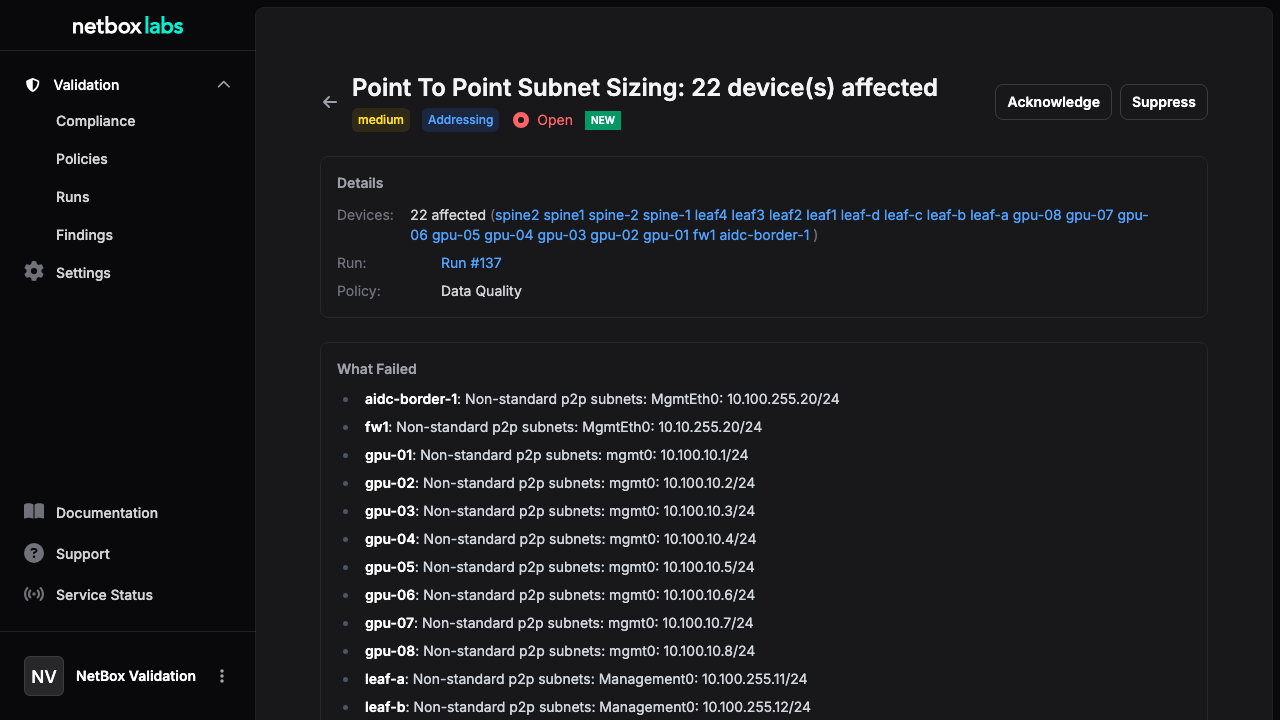
- Review each finding -- the detail page shows affected devices, failure details (rendered as markdown), and suggested remediation
- For graph findings, check the blast radius card showing protected and unprotected devices
- Set status to
acknowledgedfor items you plan to fix - Fix the underlying issue in NetBox
- Re-run validation to confirm the fix
- Mark the finding as
resolved
Bulk Operations
In the findings list, use the checkboxes to select multiple findings. A sticky action bar appears at the bottom of the page with options to Acknowledge, Resolve, Suppress, or Reopen all selected findings in one action.
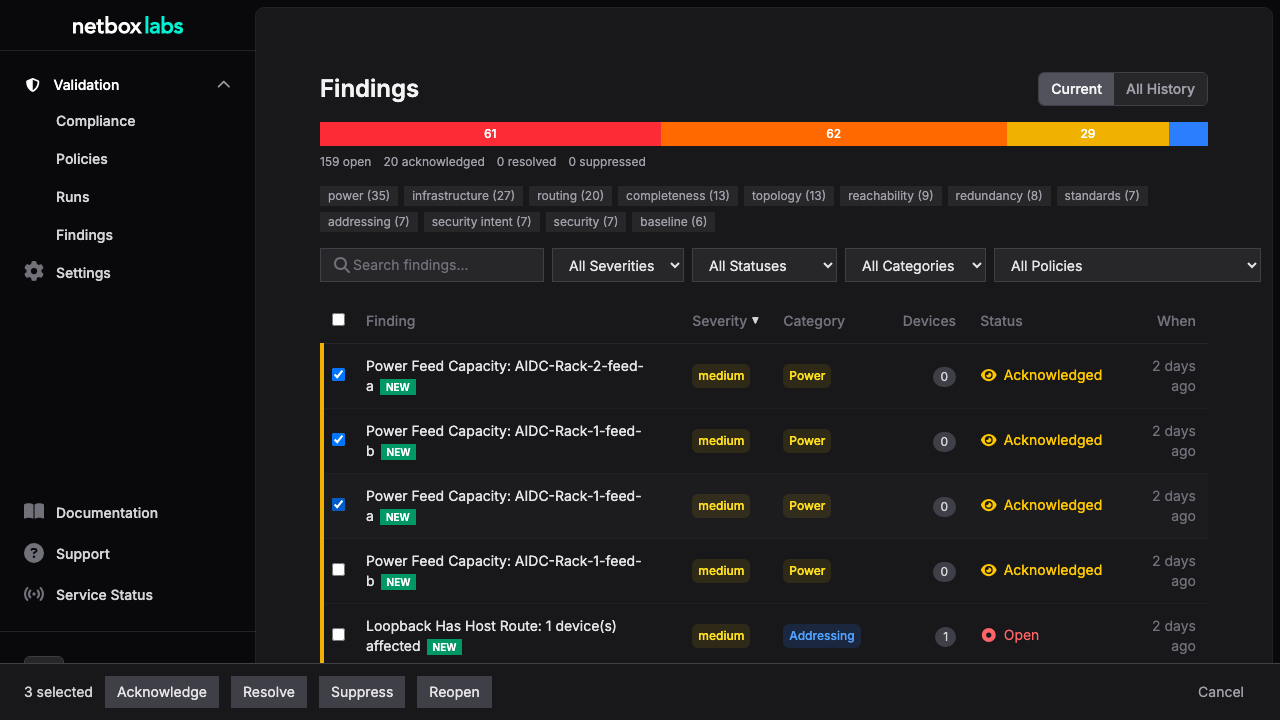
This is useful for suppressing a set of known exceptions or acknowledging an entire category at once.
Suppression
Use suppressed for findings that represent intentional deviations from policy:
- A lab device that intentionally has a single power feed
- A temporary topology during a migration
- A device role that doesn't require the minimum uplink count
Suppressed findings remain visible (filtered by status) but don't count against compliance scores in subsequent runs that detect the same condition.
Graph Findings and Blast Radius
Graph engine findings include additional context:
- Blast radius type -- feed, panel, rack, device, or cable
- Affected devices -- which devices would be impacted by a failure at the failure point
- Severity escalation -- findings automatically escalate severity based on the number of unprotected devices (3--5 devices -> high, 6--10 -> critical, 10+ -> always critical)
Using the API for Finding Management
# List current open critical findings (latest run per policy)
curl "https://your-netbox/api/plugins/validation/findings/?latest=true&status=open&severity=critical" \
  -H "Authorization: Bearer $NETBOX_TOKEN"

# Search findings by text
curl "https://your-netbox/api/plugins/validation/findings/?latest=true&q=cable" \
  -H "Authorization: Bearer $NETBOX_TOKEN"

# Filter by site or device role
curl "https://your-netbox/api/plugins/validation/findings/?latest=true&site_id=9" \
  -H "Authorization: Bearer $NETBOX_TOKEN"

# Get finding summary (counts by status, severity, category) -- respects all filters
curl "https://your-netbox/api/plugins/validation/findings/summary/?latest=true" \
  -H "Authorization: Bearer $NETBOX_TOKEN"

# Acknowledge a single finding
curl -X PATCH https://your-netbox/api/plugins/validation/findings/42/ \
  -H "Authorization: Bearer $NETBOX_TOKEN" \
  -H "Content-Type: application/json" \
  -d '{"status": "acknowledged"}'

# Bulk update status for multiple findings
curl -X POST https://your-netbox/api/plugins/validation/findings/bulk-update-status/ \
  -H "Authorization: Bearer $NETBOX_TOKEN" \
  -H "Content-Type: application/json" \
  -d '{"ids": [42, 43, 44], "status": "acknowledged"}'