Policy Pack Library
NetBox Validation ships with pre-built policy packs that you can install in one click. Starter packs cover common validation scenarios. Compliance framework packs map industry standards to NetBox-validatable checks.
Starter Packs
Browsing and Installing
In NetBox, navigate to Validation > Policy Packs in the sidebar. The library shows all available packs with their engine type, rule count, and installation status.
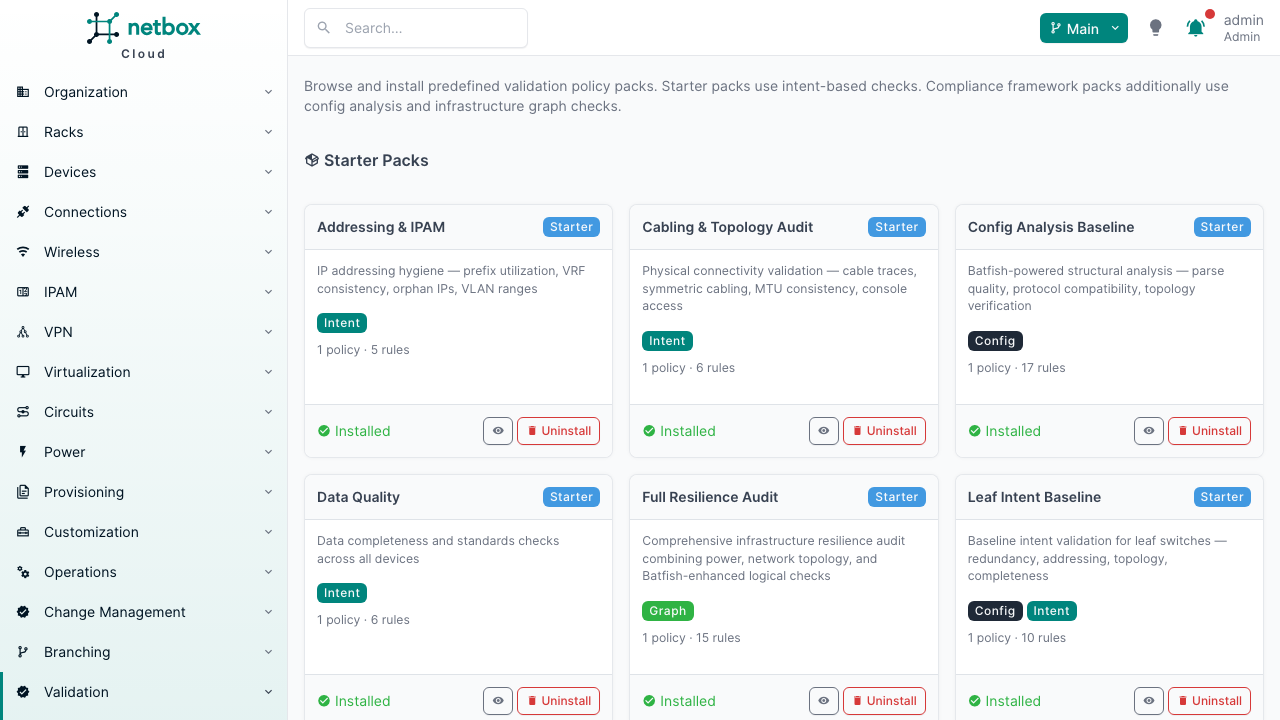
Click Install next to any pack to create the policy and all its rules in one step. Installed packs show a green checkmark and can be uninstalled (if no runs reference them).
Via API:
# List available packs
curl https://your-netbox/api/plugins/validation/policy-packs/ \
  -H "Authorization: Bearer $NETBOX_TOKEN"

# Install a pack
curl -X POST https://your-netbox/api/plugins/validation/policy-packs/addressing-ipam/install/ \
  -H "Authorization: Bearer $NETBOX_TOKEN"

# Uninstall a pack (if no runs reference it)
curl -X POST https://your-netbox/api/plugins/validation/policy-packs/addressing-ipam/uninstall/ \
  -H "Authorization: Bearer $NETBOX_TOKEN"
Available Starter Packs
| Pack | Rules | Engine | Focus |
|---|---|---|---|
| Addressing & IPAM | 5 | Intent | IP addressing and IPAM compliance |
| Cabling & Topology | 6 | Intent | Cabling integrity and topology audit |
| Data Quality | 6 | Intent | Required fields, circuit terminations, config context |
| Naming & Standards | 8 | Intent | Naming conventions and fleet-wide standards |
| Redundancy & Resilience | 5 | Intent | Uplink, power, and path redundancy |
| Security Intent | 5 | Intent | Forbidden values, VRF enforcement, secrets detection |
| Leaf Intent Baseline | 10 | Intent + Config | Baseline validation for leaf switches |
| Spine Intent Baseline | 8 | Intent + Config | Baseline validation for spine switches |
| Config Analysis Baseline | 17 | Config | Config parse quality, BGP, routing, ACLs |
| Pre-Change Config Validation | 10 | Config | Differential config validation for branches |
| Power Resilience | 6 | Graph | Power chain completeness, redundancy, blast radius |
| Network Resilience | 9 | Graph | Network topology and failure domain analysis |
| BGP Attribute Verification | 3 | Config | BGP local preference, MED, and route advertisement |
| Full Resilience Audit | 15 | Graph + Config | All 15 graph checks -- power, topology, and logical |
Customizing After Installation
Installed packs create regular policies and rules -- you can edit them freely in NetBox:
- Narrow the scope: Add site, role, or platform filters to the policy
- Adjust parameters: Edit individual rules to change thresholds (e.g.,
min_uplinks: 4instead of the default2) - Add or remove rules: Delete rules you don't need, add new ones
- Set triggers and schedule: Enable branch merge or CR triggers, add a cron schedule
YAML Import/Export
Policies can also be imported and exported as YAML:
Export:
# Single policy
curl -X POST https://your-netbox/api/plugins/validation/policies/1/export/ \
  -H "Authorization: Bearer $NETBOX_TOKEN"

# All policies
curl -X POST https://your-netbox/api/plugins/validation/policies/export-all/ \
  -H "Authorization: Bearer $NETBOX_TOKEN"
YAML format:
name: Leaf Intent Baseline
description: Standard intent validation for leaf switches
enable_config_engine: false
enable_graph_engine: false
trigger_on_branch_merge: false
trigger_on_cr_submit: true
schedule: "0 2 * * *"
rules:
  - name: No Duplicate IPs
    engine: intent
    category: addressing
    check_name: no_duplicate_ips
    severity: critical

  - name: Minimum Uplinks
    engine: intent
    category: redundancy
    check_name: min_cabled_uplinks
    severity: critical
    parameters:
      min_uplinks: 2
Import:
curl -X POST https://your-netbox/api/plugins/validation/policies/import/ \
  -H "Authorization: Bearer $NETBOX_TOKEN" \
  -H "Content-Type: application/json" \
  -d @leaf-intent-baseline.yaml
Compliance Framework Packs
Available to Premium tier customers.
Nine compliance framework policy packs map industry standards and regulatory frameworks to NetBox-validatable checks. Each pack documents what it covers and explicitly notes what requires other tools.
These provide design-time compliance validation -- they validate infrastructure intent (the design documented in NetBox) before deployment. This is complementary to runtime compliance tools that validate live device state after deployment. NetBox Validation prevents compliance drift; runtime tools detect it.
Available Frameworks
| Pack | Framework | Engines | Rules |
|---|---|---|---|
| CLOS Fabric Design | CLOS leaf-spine architecture | Intent + Config + Graph | 19 |
| TIA-942 | Data center tiers (I--IV) | Intent + Graph | 20 |
| NIS2 / DORA | EU cyber resilience regulation | Intent + Config + Graph | 21 |
| NIST 800-53 | US federal security controls | Intent + Config + Graph | 26 |
| NERC CIP | Critical infrastructure protection | Intent + Config + Graph | 18 |
| PCI-DSS | Payment card data security | Intent + Config + Graph | 16 |
| MANRS | Routing security best practices | Intent + Config + Graph | 15 |
| ISO 27001:2022 | Information security management | Intent + Config + Graph | 22 |
| HIPAA Security Rule (2026) | US healthcare ePHI infrastructure safeguards | Intent + Config + Graph | 20 |
Total: 177 rules across 9 frameworks.
Installing Framework Packs
In NetBox, navigate to Validation > Policy Packs. Compliance framework packs appear in a separate section from starter packs. Click Install to load a framework with all its rules.
Via API:
curl -X POST https://your-netbox/api/plugins/validation/policy-packs/compliance-nist-800-53/install/ \
  -H "Authorization: Bearer $NETBOX_TOKEN"
After Installation: Customize Parameters
Framework packs include default values for site-specific parameters. After loading, review each policy in NetBox and customize these parameters for your environment:
- VRF names: Replace
MGMTwith your management VRF name - Restricted prefixes: Set your actual restricted prefix ranges
- CDE subnets (PCI-DSS): Replace
172.16.0.0/16with your cardholder data environment prefix - ePHI zone (HIPAA): Set
zones[].prefixes, the ePHIvrfname, andassert_traffic_blockedsource/destination to your clinical environment - Spine role (CLOS): Set
spine_roleto match your spine device role name
Parameter customization is done by editing individual rules on the policy detail page in NetBox.
Coverage Transparency
Each pack explicitly documents both what it covers and what it doesn't. NetBox Validation validates what NetBox can validate -- network segmentation, power redundancy, routing security, config hygiene. Controls that require runtime monitoring, human procedures, or physical security are explicitly called out as out of scope.
Framework Details
CLOS Fabric Design (19 rules)
Coverage: Leaf-spine full mesh, /31 P2P links, loopback /32s, eBGP multipath, EVPN/VXLAN overlay, ECMP path redundancy, SPOF detection.
Not covered: Traffic engineering, QoS policies, telemetry pipelines.
Prerequisites: Set spine_role parameter to match your spine device role name. Config engine checks require Config Templates assigned to devices.
| Control Area | Key Checks | Engine |
|---|---|---|
| Fabric connectivity | leaf_spine_connectivity, symmetric_cabling | Intent |
| Addressing | point_to_point_subnet_sizing, loopback_has_host_route, no_duplicate_ips | Intent |
| Routing | bgp_sessions, bgp_unestablished_reason, bgp_process_config, bgp_localpref_equals | Config |
| Overlay | evpn_l3_vni_consistency, vxlan_vni_config | Config |
| Resilience | device_single_point_of_failure, forwarding_path_redundancy | Graph |
TIA-942 Data Center Tiers (20 rules)
Coverage: Power path completeness (Tier I+), N+1 feed redundancy (Tier II+), panel-level independence and concurrent maintainability (Tier III+), WAN circuit diversity, physical SPOF detection, asset documentation.
Not covered: Cooling, fire suppression, physical security, mechanical systems.
Prerequisites: Requires power feeds, power panels, and power port cabling in NetBox. Circuit and provider data for WAN diversity checks.
| Tier | Key Checks | Engine |
|---|---|---|
| Tier I | power_path_complete, power_feed_capacity | Graph |
| Tier II | power_redundancy (feed), power_feed_blast_radius | Graph |
| Tier III | power_redundancy (panel), concurrent_maintainability | Graph |
| General | device_single_point_of_failure, site_connectivity_redundancy, asset_documentation_complete | Graph + Intent |
NIS2 / DORA (21 rules)
Controls mapped: NIS2 Art.21(2) risk analysis, incident handling, business continuity, supply chain security, network security, vulnerability assessment, cyber hygiene. DORA Art.9 ICT risk, Art.10 concentration risk, Art.11 testing.
Not covered: Governance processes, authority reporting, staff training, incident response procedures.
Prerequisites: Customize management_vrf_name (default: MGMT) and restricted_prefixes parameters.
NIST 800-53 (26 rules)
Control families mapped: SC (System and Communications Protection), CM (Configuration Management), CP (Contingency Planning), AC (Access Control).
Not covered: AU (audit logging), AT (training), PS (personnel), PE (physical), SI (system monitoring).
Prerequisites: Customize management_vrf_name, restricted_prefixes, and ospf_authentication_configured.require_type parameters.
NERC CIP (18 rules)
Controls mapped: CIP-005 (Electronic Security Perimeter), CIP-007 (System Security Management), CIP-010 (Configuration Change Management), CIP-009 (Recovery Plans).
Not covered: CIP-004 (personnel training), CIP-006 (physical access logs), CIP-011 (information protection).
Prerequisites: Customize management_vrf_name for your BES management VRF and restricted_prefixes for ESP boundary prefixes.
PCI-DSS (16 rules)
Controls mapped: Req 1 (CDE network segmentation via VRF + ACL), Req 2 (secure config -- no defaults, no plaintext), Req 11 (segmentation testing via differential reachability).
Not covered: Req 3--4 (data encryption), Req 6 (application security), Req 9 (physical access).
Prerequisites: Replace default CDE subnet 172.16.0.0/16 with your actual cardholder data environment prefix. Configure assert_traffic_blocked source/destination IPs for your corporate-to-CDE boundary.
MANRS (15 rules)
Actions mapped: Action 1 (filtering -- BGP session validation, prefix filter verification), Action 2 (anti-spoofing -- duplicate IP detection, ACL verification), Action 3 (coordination -- contact documentation), Action 4 (global validation -- BGP authentication, loop detection).
Not covered: RPKI ROA publication, IRR database entries.
Prerequisites: No site-specific customization required. Works with default parameters for BGP-heavy environments.
ISO 27001:2022 (22 rules)
Controls mapped: A.8.20 (network security), A.8.21 (network services), A.8.22 (segregation), A.8.24 (cryptography), A.8.9 (config management), A.5.37 (documented procedures).
Not covered: A.5.15--18 (identity management), A.7 (physical security), A.8.25--28 (application controls).
Prerequisites: Customize management_vrf_name (default: MGMT) and restricted_prefixes parameters.
HIPAA Security Rule 2026 (20 rules)
Design-time validation of the network-infrastructure safeguards in the HIPAA Security Rule 2026 NPRM (90 FR 898). It validates the infrastructure design documented in NetBox -- asset inventory, network map, ePHI segmentation, encryption-in-transit, and resilience -- before deployment, complementing runtime tools that inspect live device state.
Based on the proposed rule. The NPRM was published January 6, 2025; a final rule had not been published as of mid-2026. Citations reflect the proposal, and final CFR numbering -- especially the network-segmentation specification under §164.312 -- may change. Treat this pack as design-target validation, not an attestation of compliance.
Controls mapped:
| Control Area | CFR Citation | Key Checks | Engine |
|---|---|---|---|
| Technology asset inventory & network map | §164.308(a)(1) | asset_documentation_complete, cable_trace_complete, circuit_terminations_complete, contact_assigned_to_site | Intent |
| Network segmentation (ePHI isolation, prevent lateral movement) | §164.312 (proposed) | ephi_zone_segmentation, management_vrf_enforced, restricted_prefix_usage, ip_vrf_consistency, assert_traffic_blocked | Intent + Config |
| Encryption in transit / transmission security | §164.312(e), §164.312(a)(2)(iv) | secure_protocols_enforced, no_forbidden_values_in_context, no_plaintext_secrets_in_context | Intent |
| Authentication (management & routing planes) | §164.312(d), §164.312(a)(1) | bgp_authentication_configured, ospf_authentication_configured, management_access_acl_configured | Config |
| Contingency / availability (72-hour restoration) | §164.308(a)(7) | power_redundancy, device_single_point_of_failure, site_connectivity_redundancy, circuit_path_diversity | Graph |
| Change validation (keep map/risk analysis current) | §164.306(d), §164.308(a)(1) | differential_reachability | Config |
Not covered (operational/runtime controls, ~60% of the NPRM): MFA, anti-malware, audit logging/SIEM, vulnerability scanning and penetration-test cadence, patch SLAs, workforce access termination, risk-analysis and incident-response documentation, business-associate agreements, training, physical security.
Prerequisites: Replace the empty zones[].prefixes and restricted_prefixes with your actual ePHI/clinical prefixes, set the ePHI vrf name (default placeholder EPHI) and management_vrf_name (default MGMT), and set the assert_traffic_blocked src_ip/dst_ip to your untrusted-source and ePHI-destination subnets.