Getting Started
This tutorial walks you through your first validation -- from installing a policy pack to reviewing compliance scores. You'll have a working validation pipeline in minutes.
Note: Administrative tasks like configuring policies, rules, and scoping are done within NetBox itself. Day-to-day usage -- reviewing results, managing findings, and monitoring compliance -- is accessible via the NetBox Labs platform in a streamlined experience.
Prerequisites
- NetBox 4.5 or later in NetBox Cloud
- Admin or staff access to NetBox
- At least a few devices with interfaces, IPs, and cables populated
Step 1: Install a Starter Policy Pack
The fastest way to get started is to install a pre-built policy pack. In NetBox, navigate to Validation > Policy Packs in the sidebar.
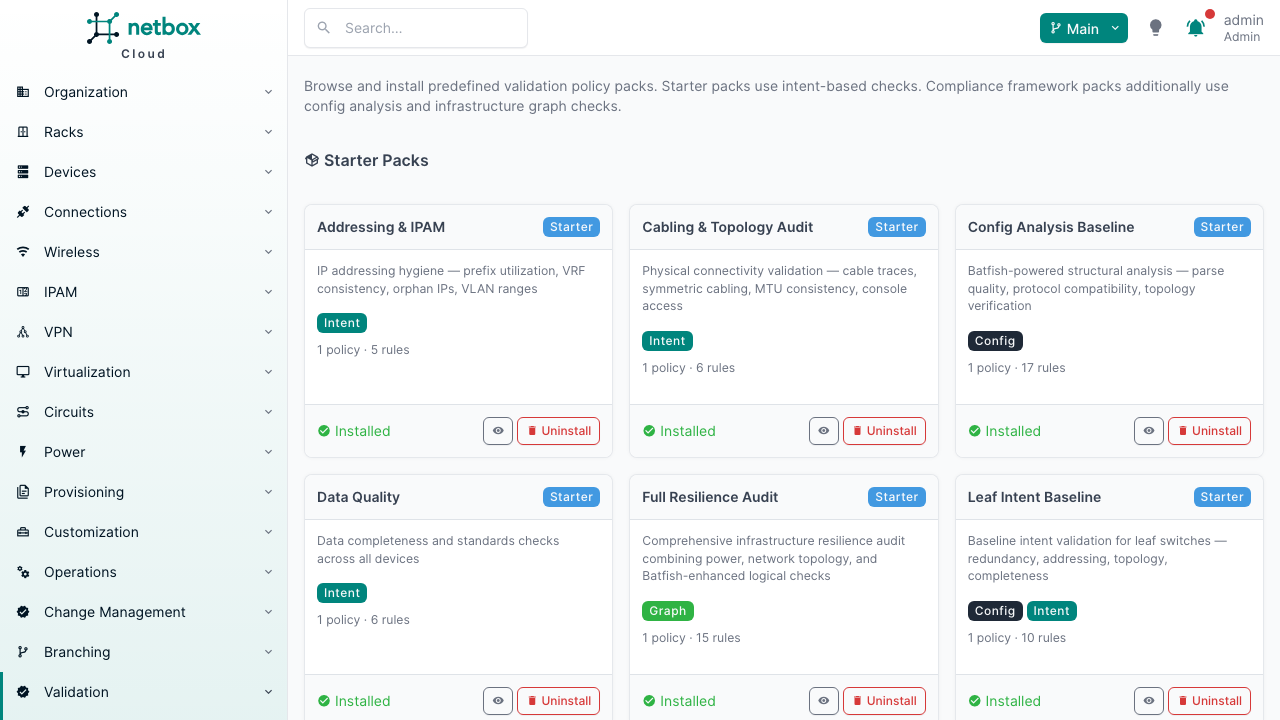
Browse the available packs. For your first validation, Addressing & IPAM or Data Quality are good starting points -- they use the intent engine (no additional infrastructure required) and produce meaningful results on most datasets.
Click Install next to a pack. This creates a policy with all its rules in one step.
Via API:
# List available packs
curl https://your-netbox/api/plugins/validation/policy-packs/ \
  -H "Authorization: Bearer $NETBOX_TOKEN"

# Install a pack
curl -X POST https://your-netbox/api/plugins/validation/policy-packs/addressing-ipam/install/ \
  -H "Authorization: Bearer $NETBOX_TOKEN"
Step 2: Review the Installed Policy
After installation, navigate to Validation > Policies in the NetBox Labs platform to see your new policy.
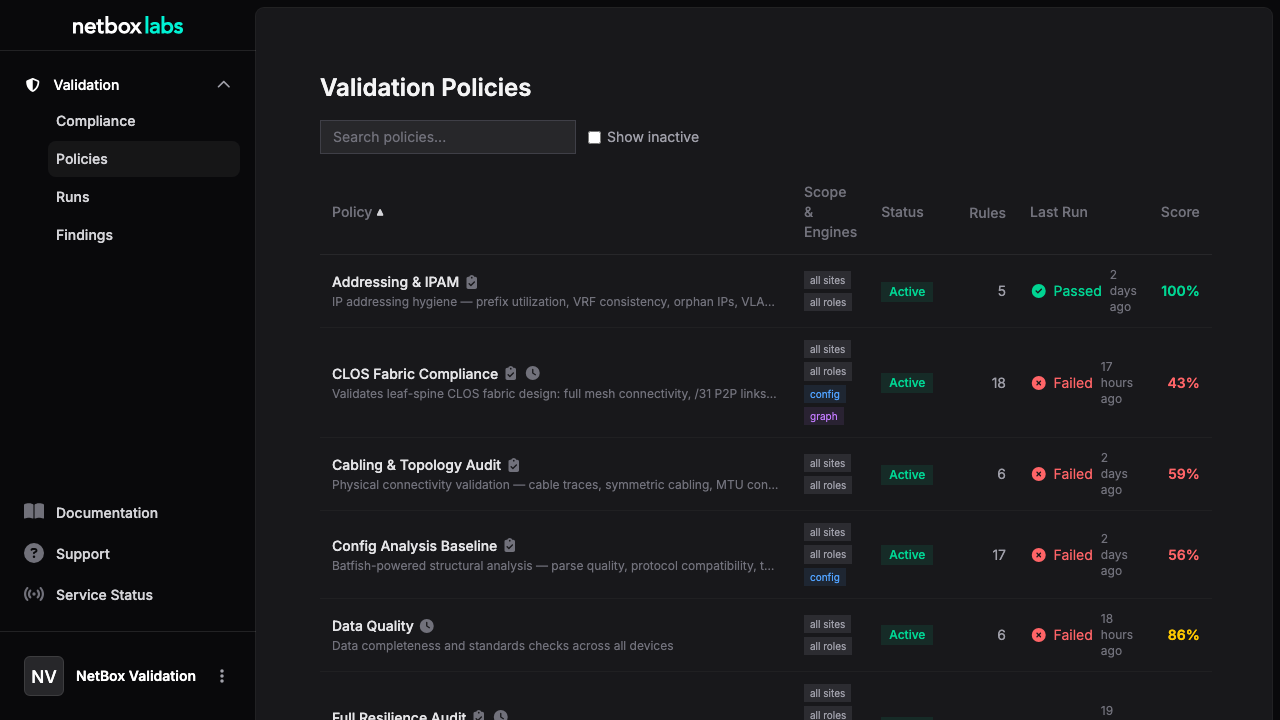
Click into the policy to see its rules, scope, and configuration. By default, installed packs are scoped to all sites and all roles -- you can narrow the scope from the policy detail page in NetBox.
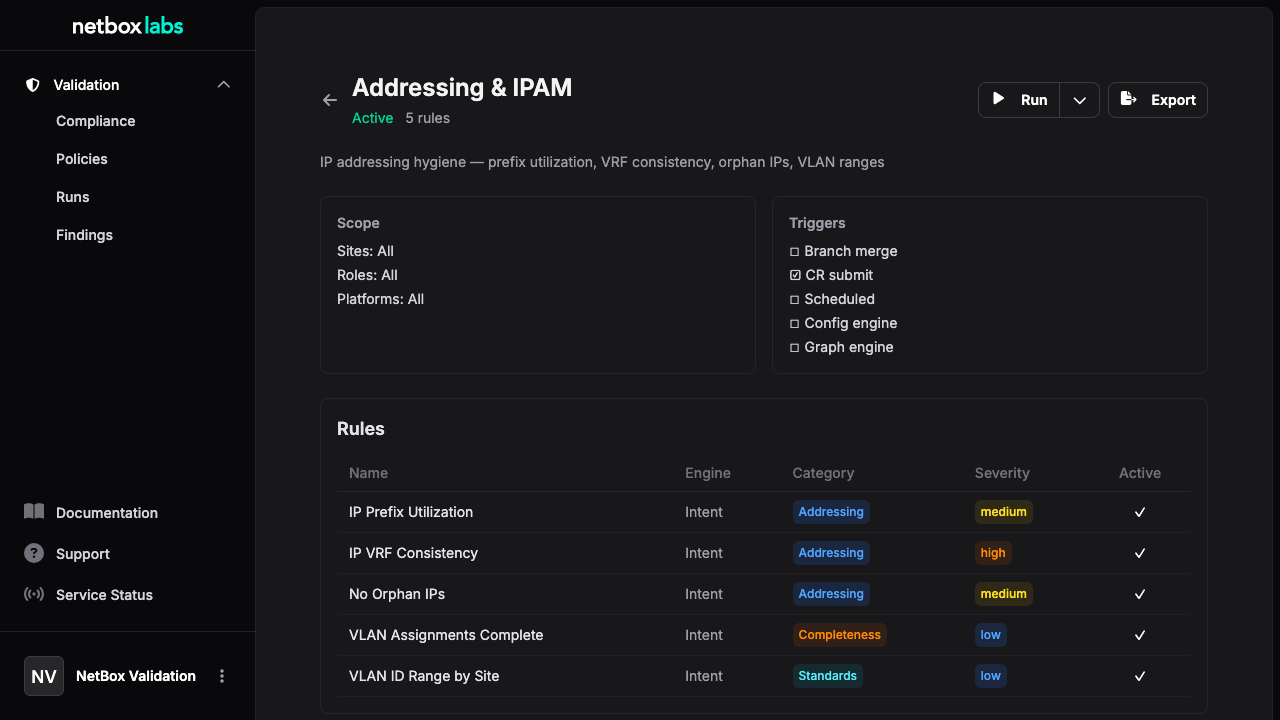
Each rule shows its engine, category, check name, severity, and any custom parameters.
Via API:
curl https://your-netbox/api/plugins/validation/policies/ \
  -H "Authorization: Bearer $NETBOX_TOKEN"
Step 3: Run Validation
From the policy detail page in NetBox, click Run Now. This enqueues a validation run via the background task queue and redirects you to the run detail page.
You can also trigger a run from the policy list in the NetBox Labs platform -- each policy row shows a Re-run action.
Via API:
# Create a run
curl -X POST https://your-netbox/api/plugins/validation/runs/ \
  -H "Authorization: Bearer $NETBOX_TOKEN" \
  -H "Content-Type: application/json" \
  -d '\{"policy": 1, "trigger": "manual"\}'

# Execute it (runs complete in seconds -- no device polling)
curl -X POST https://your-netbox/api/plugins/validation/runs/1/execute/ \
  -H "Authorization: Bearer $NETBOX_TOKEN"
Step 4: Review Results
Open the run detail in the NetBox Labs platform. It shows the overall score, per-check breakdown, and per-device results.
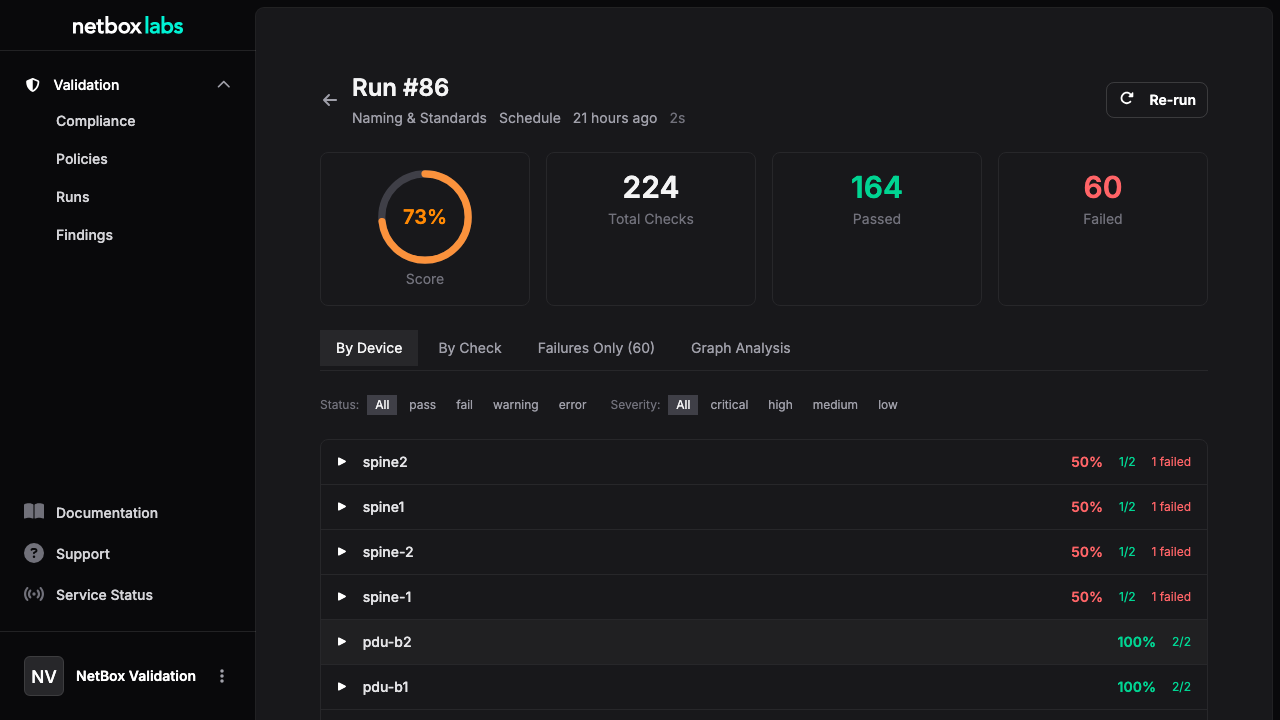
Each result shows:
- Status: pass, fail, skip, warning, or error
- Device: which device was evaluated
- Check: which check ran
- Expected vs. Actual: what the check expected and what it found
- Remediation: a suggested fix for failures
You can filter results by status, device, or check name.
Via API:
# Get run summary
curl https://your-netbox/api/plugins/validation/runs/1/ \
  -H "Authorization: Bearer $NETBOX_TOKEN"

# Get detailed results
curl "https://your-netbox/api/plugins/validation/results/?run_id=1" \
  -H "Authorization: Bearer $NETBOX_TOKEN"
Step 5: Review Findings
Navigate to Findings in the NetBox Labs platform to see aggregated failures. Findings group related check failures into actionable items -- instead of seeing the same failure repeated for 10 devices, you see one finding that lists all affected devices.
The findings list defaults to the Current view, which shows only findings from the latest run of each policy. This filters out historical duplicates so you see each unique issue once. Switch to All History to see findings from every run.
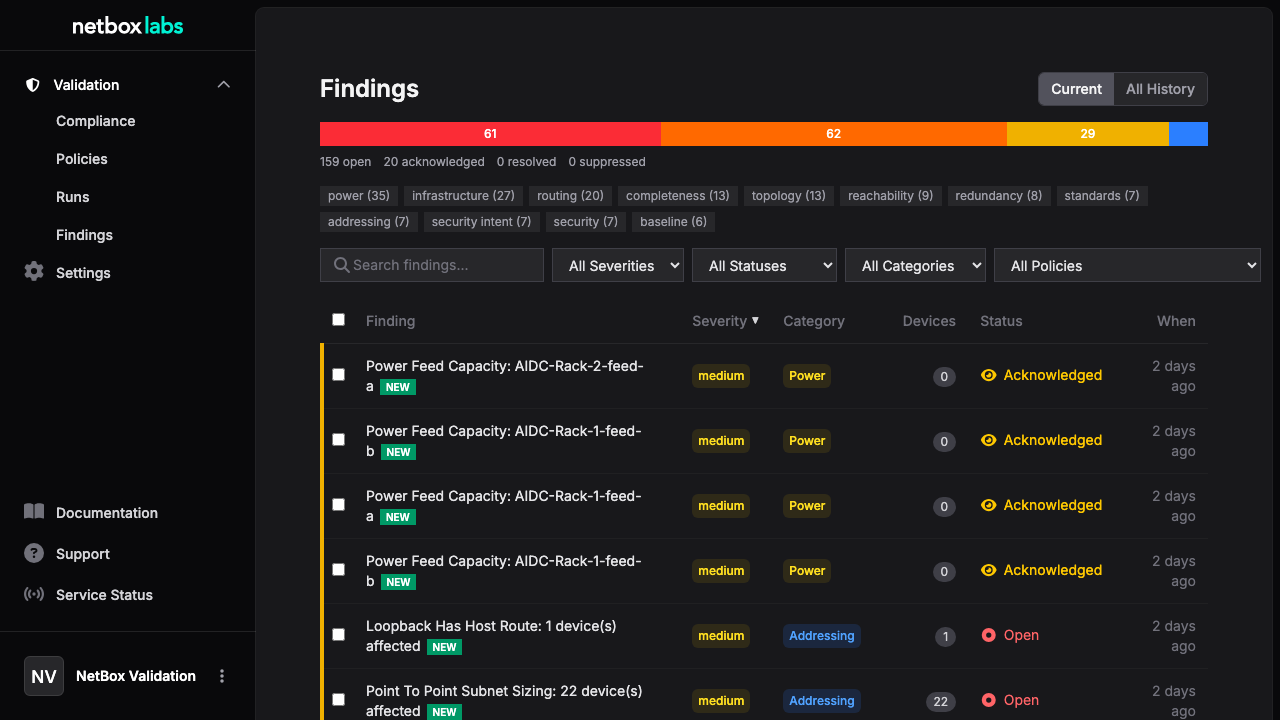
Use the search bar to filter findings by title, description, or remediation text. Findings that appeared for the first time are marked with a NEW badge to help you spot emerging issues.
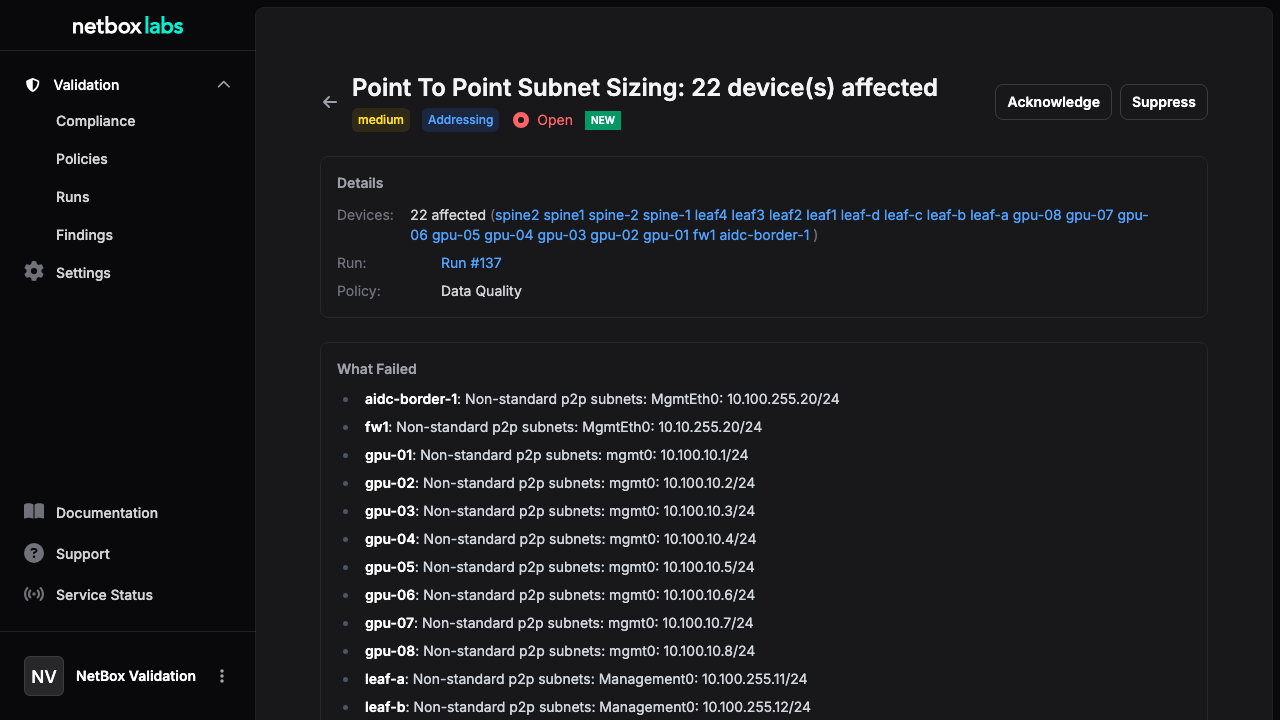
Click into a finding for details, including affected devices and remediation guidance. You can change finding status (open > acknowledged > resolved or suppressed) to track your triage workflow.
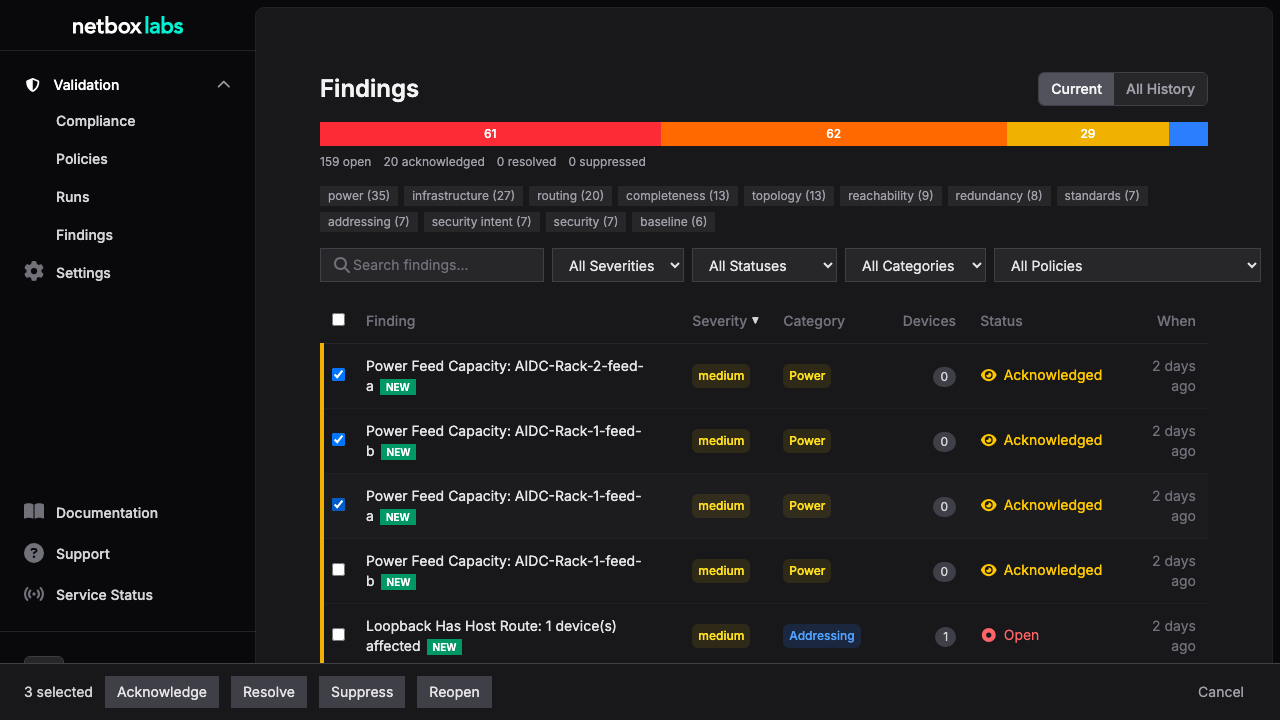
To manage multiple findings at once, use the checkboxes to select findings and the bulk action bar to change their status in batch.
Via API:
# Current findings (latest run per policy)
curl "https://your-netbox/api/plugins/validation/findings/?latest=true" \
  -H "Authorization: Bearer $NETBOX_TOKEN"

# Search findings
curl "https://your-netbox/api/plugins/validation/findings/?latest=true&q=cable" \
  -H "Authorization: Bearer $NETBOX_TOKEN"
Step 6: Check Compliance Scores
Navigate to Compliance in the NetBox Labs platform to see the compliance dashboard. This shows:
- Fleet score -- overall compliance percentage across all policies and devices
- Compliance trend -- how scores are changing over time
- Score by dimension -- breakdown by site, role, or policy
- Finding hotspots -- which categories have the most findings
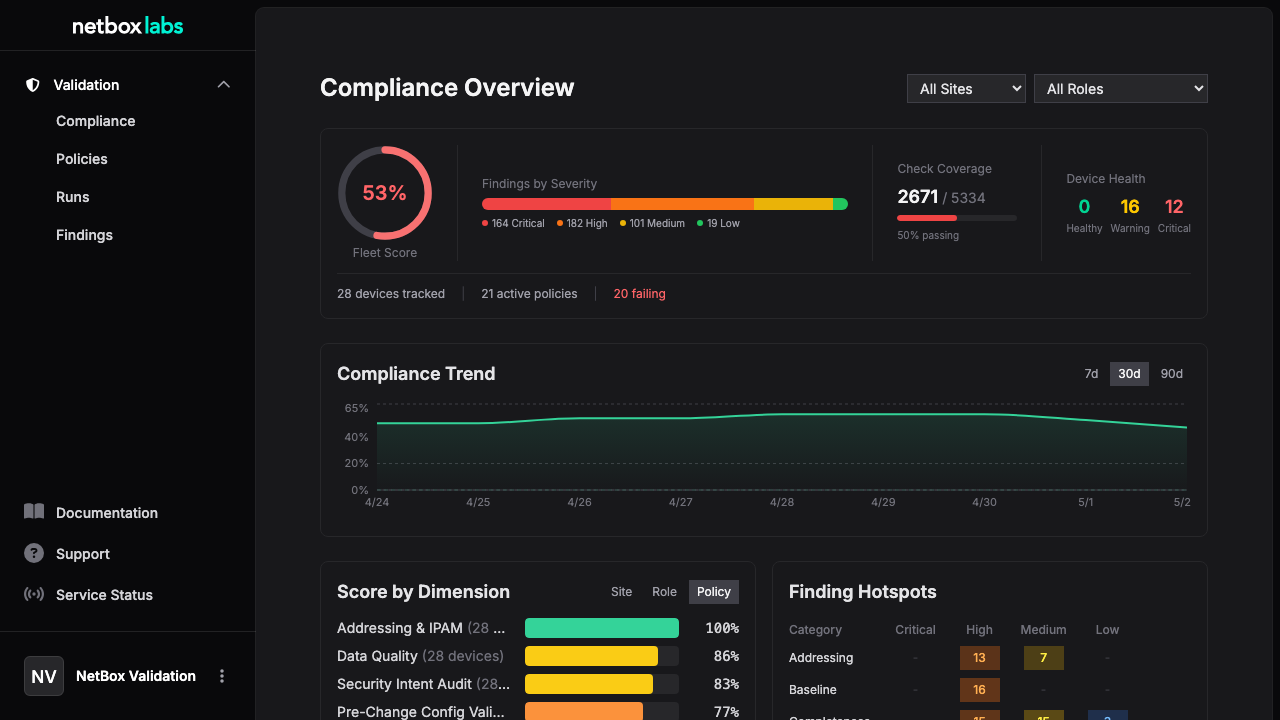
Use the site and role filters to focus on specific segments of your infrastructure.
Via API:
# Get compliance scores for a specific device
curl "https://your-netbox/api/plugins/validation/compliance/?device_id=10" \
  -H "Authorization: Bearer $NETBOX_TOKEN"
What's Next
You've completed your first validation run. Here's where to go from here:
- Workflows -- Set up pre-change validation with branches, schedule continuous compliance, and manage findings
- Engines -- Learn about the config and graph engines for deeper analysis
- Policy Packs -- Explore compliance framework packs (NIST 800-53, PCI-DSS, ISO 27001, and more)
- Check Reference -- Browse all 93 built-in checks and their parameters
- Core Concepts -- Understand the data model in detail
Creating Your Own Policy
Instead of installing a pack, you can create a policy from scratch in NetBox:
- Navigate to Validation > Policies > + Add
- Name the policy and set its scope (sites, roles, platforms, tags)
- Optionally enable the config engine and/or graph engine
- Set triggers (branch merge, CR submit) and a cron schedule
- Save, then add rules from the policy detail page
# Or via API:
curl -X POST https://your-netbox/api/plugins/validation/policies/ \
  -H "Authorization: Bearer $NETBOX_TOKEN" \
  -H "Content-Type: application/json" \
  -d '{
    "name": "DC1 Leaf Validation",
    "is_active": true,
    "sites": [1],
    "roles": [3]
  }'