NetBox Data Exchange
NetBox Data Exchange (NDX) is a curated catalog of tens of thousands of infrastructure device types across hundreds of vendors, browsable and importable directly from NetBox. Each device type includes full component definitions - interfaces, power ports, console ports, module bays - ready to use. Paid plans add lifecycle dates, thermal specs, operational data, protocol profiles, and more.
Availability: Included with all NetBox Cloud plans. Free plans include the full device type catalog with complete component definitions. Paid plans add enrichment data - lifecycle, thermal, environmental, operational, platform identification, protocol profiles, elevation imagery, and data provenance. The catalog is also browsable at netboxlabs.com/ndx.
What's Included
| Feature | Free | Paid |
|---|---|---|
| Browse full device type catalog from within NetBox | Yes | Yes |
| Import device types with full DTL definitions (interfaces, power ports, module bays, etc.) | Yes | Yes |
| Automatic catalog sync (new and updated types) | Yes | Yes |
| Lifecycle data (GA, end-of-life, end-of-sale dates) | - | Yes |
| Thermal specs (TDP, airflow direction, cooling method) | - | Yes |
| Environmental parameters (temperature, humidity, altitude, MTBF) | - | Yes |
| Operational data (power draw, noise levels) | - | Yes |
| Platform identification (network OS, API types) | - | Yes |
| Protocol profiles (SNMP OIDs, gNMI, NETCONF, Redfish, Modbus) | - | Yes |
| Elevation imagery (front and rear) | - | Yes |
| Data provenance (source URLs, confidence scores) | - | Yes |
Browsing the Catalog
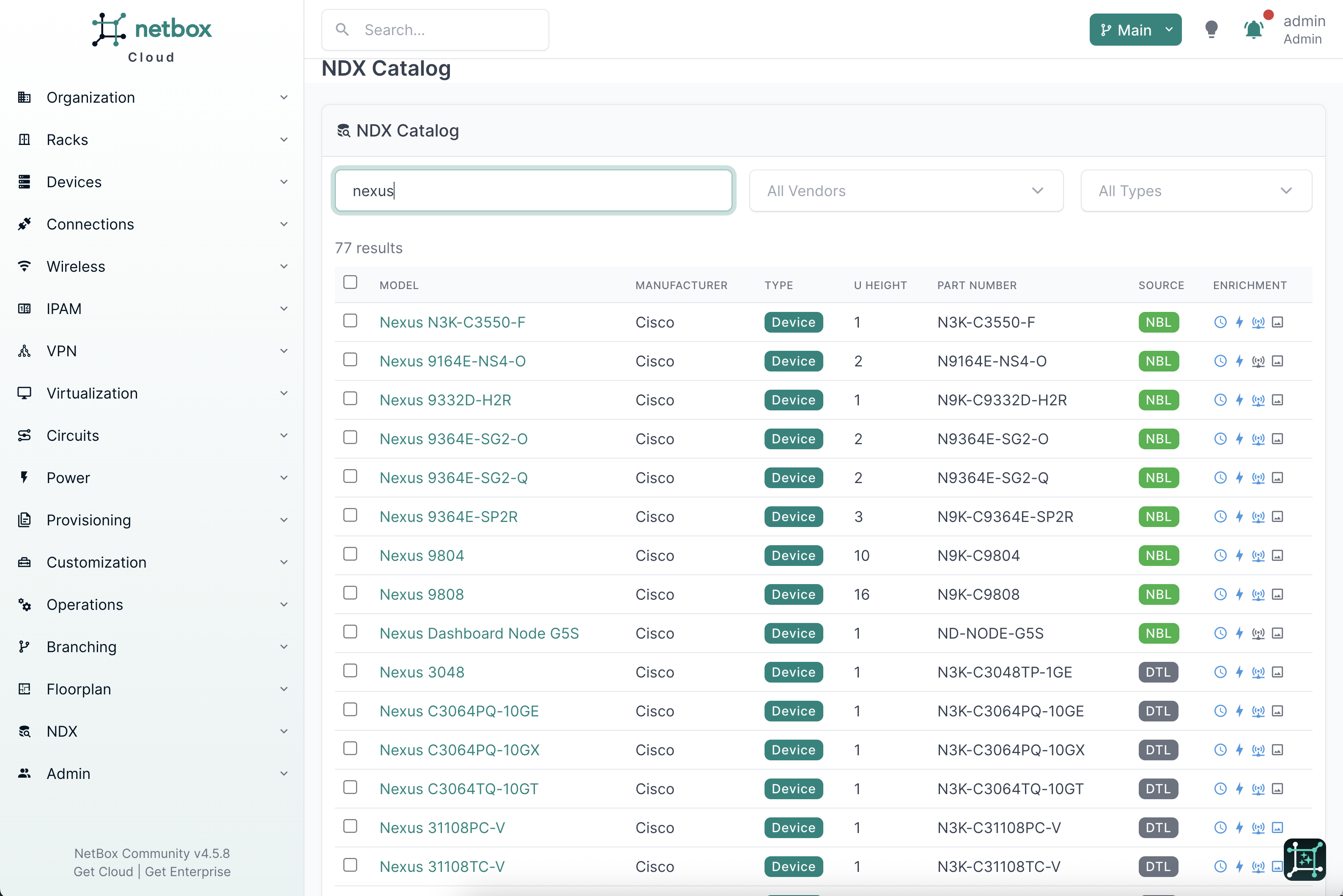
Navigate to NDX > Catalog in the NetBox sidebar. The catalog presents every device type in the NDX repository with live filtering:
- Search - type a model name, part number, or keyword to filter results instantly
- Vendor filter - narrow to a specific manufacturer
- Type filter - filter by device type category (e.g., switch, router, PDU, server)
- Enrichment indicators - badges show which device types have enrichment data available beyond the base DTL definition
Filtering is live - results update as you type without page reloads.
Importing Device Types
Single import
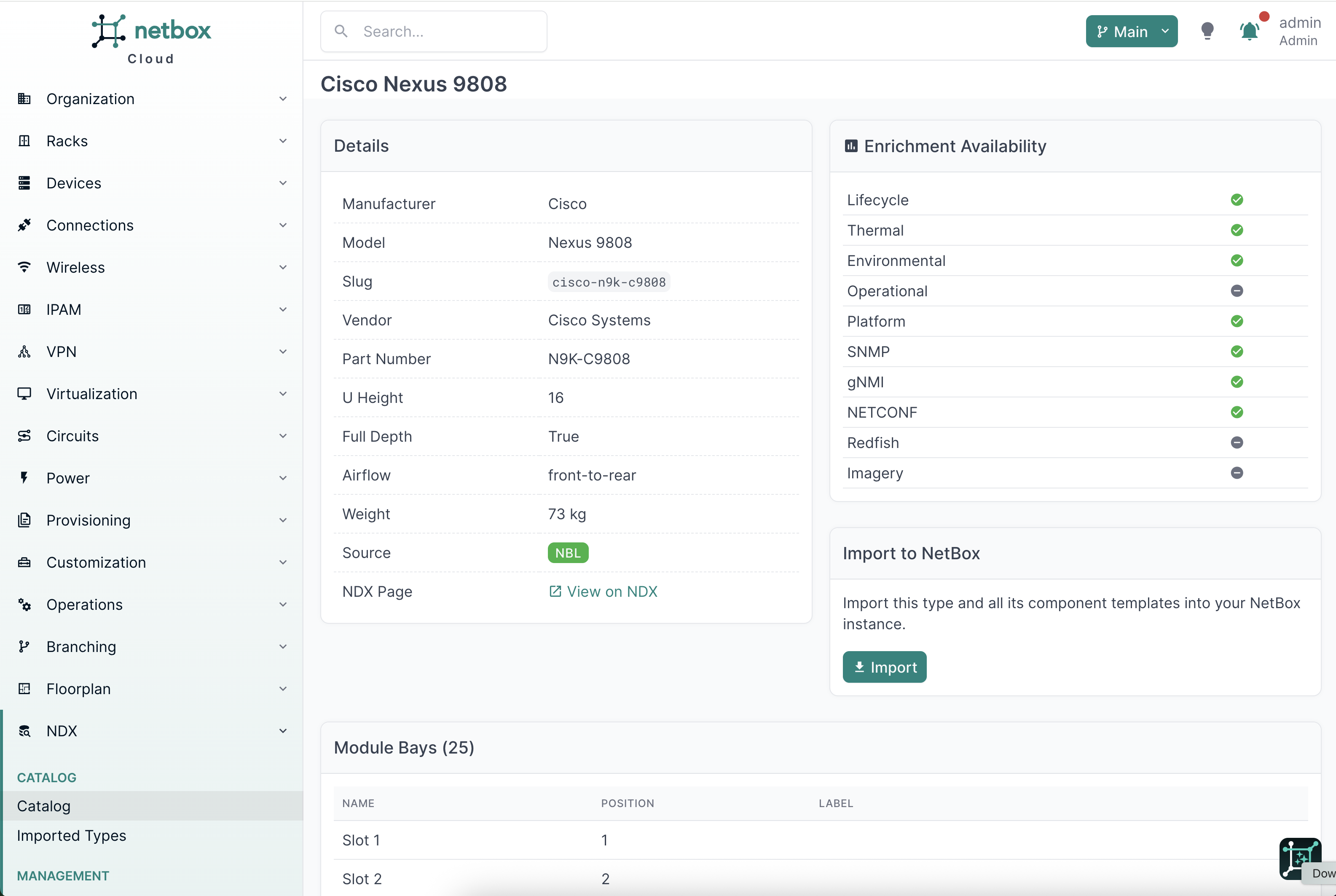
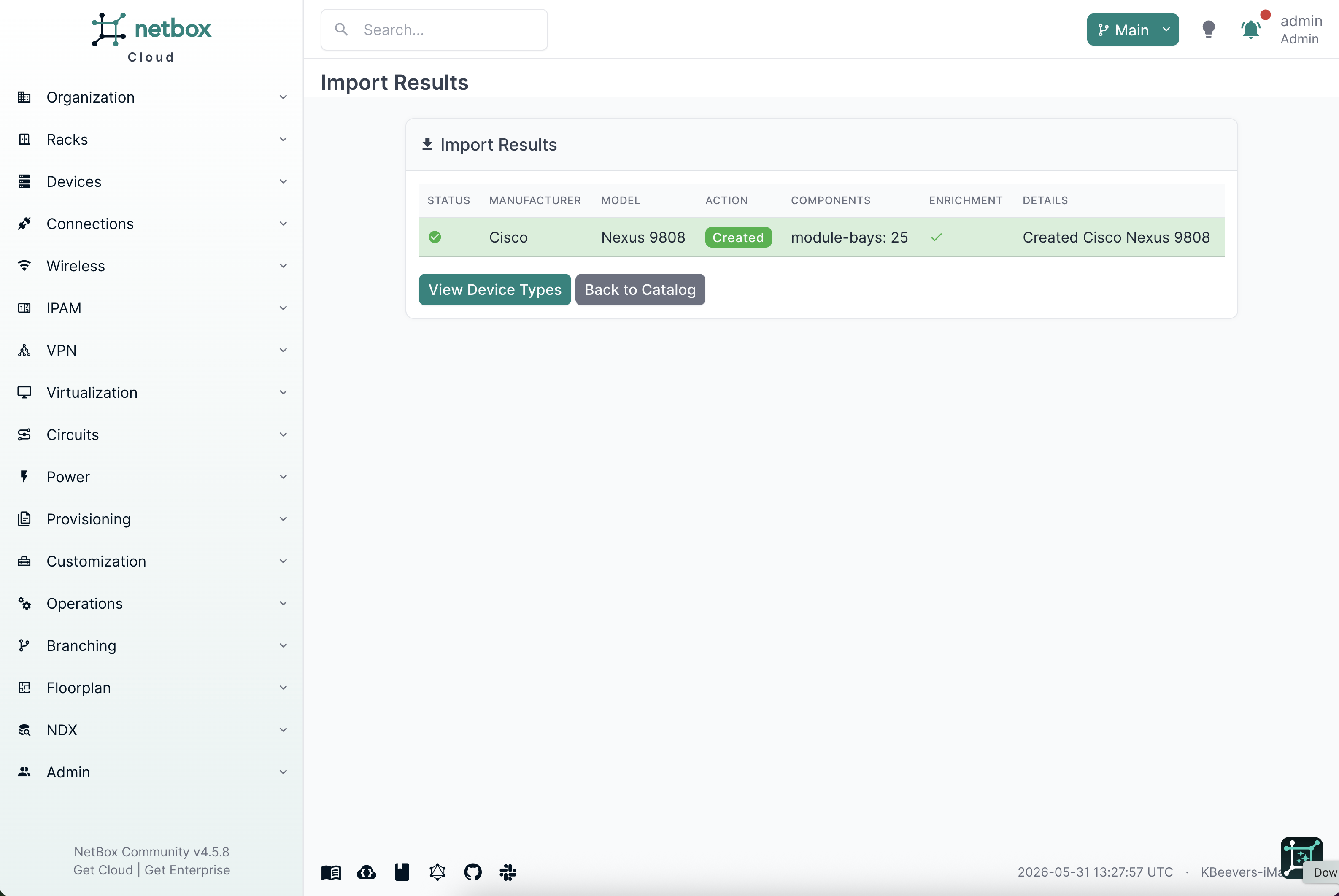
Click any device type in the catalog to view its detail page. The detail page shows the full specification - component counts, source badge, and enrichment availability. Click Import to create the device type in NetBox with all component templates (interfaces, power ports, console ports, module bays, device bays, etc.).
Bulk import
Select multiple device types from the catalog list using the checkboxes, then click Import Selected. All selected types are imported in a single operation.
What gets created
Importing a device type creates the NetBox DeviceType object along with all associated component templates defined in the DTL entry. On paid plans, enrichment data (lifecycle, thermal, operational, etc.) is also imported and linked to the device type.
Re-importing
If a device type already exists in NetBox, importing it again updates the existing type with the latest catalog data rather than creating a duplicate.
Viewing Enrichment Data
Paid plans include enrichment data for device types that have it in the NDX catalog. Enrichment is surfaced in two places.
DeviceType detail panel
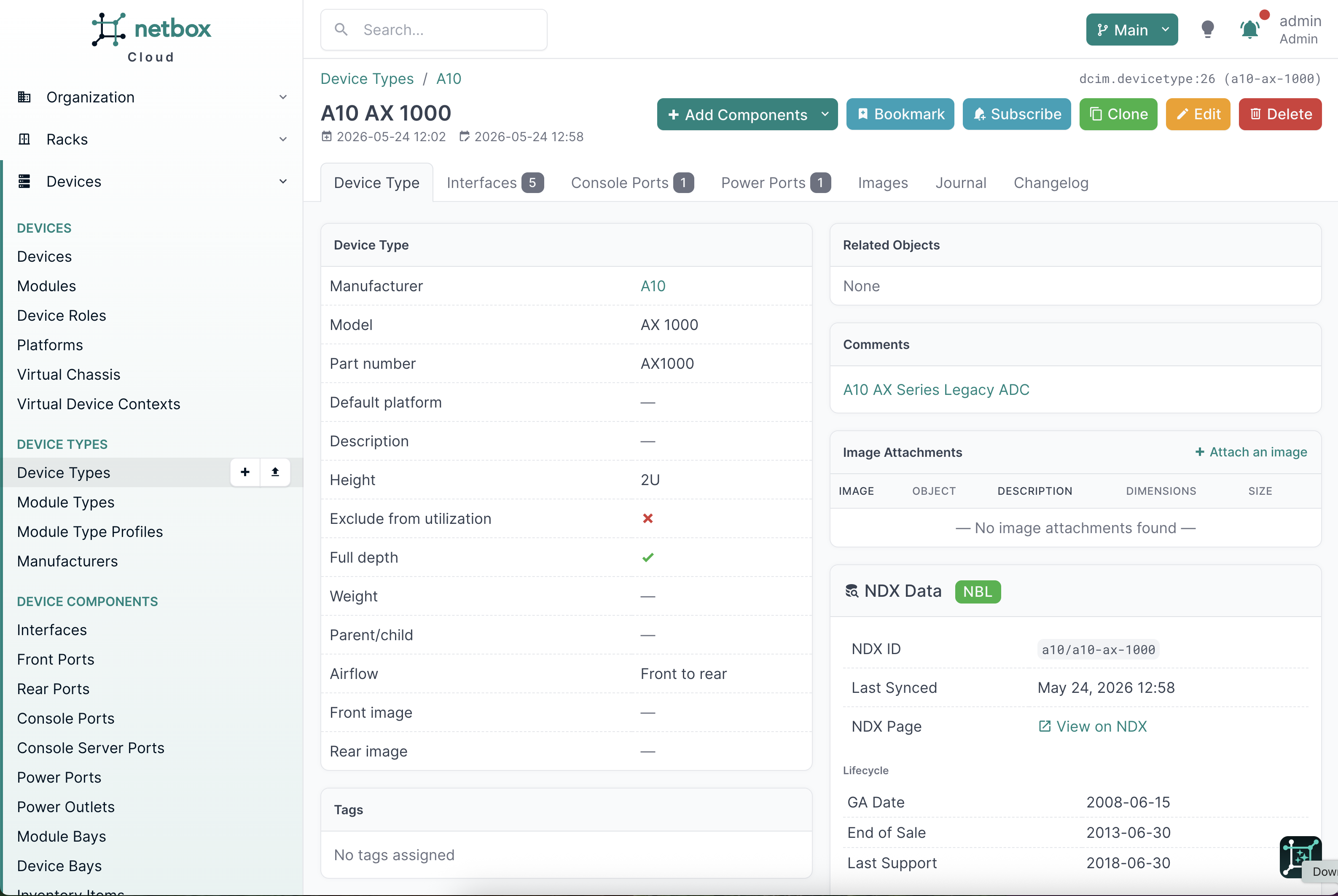
After importing a device type with enrichment, the standard NetBox DeviceType page (DCIM > Device Types > [type]) includes an NDX enrichment summary panel. This panel shows key highlights - lifecycle status, thermal specs, and operational data - at a glance, without leaving the page you already use.
Full enrichment detail
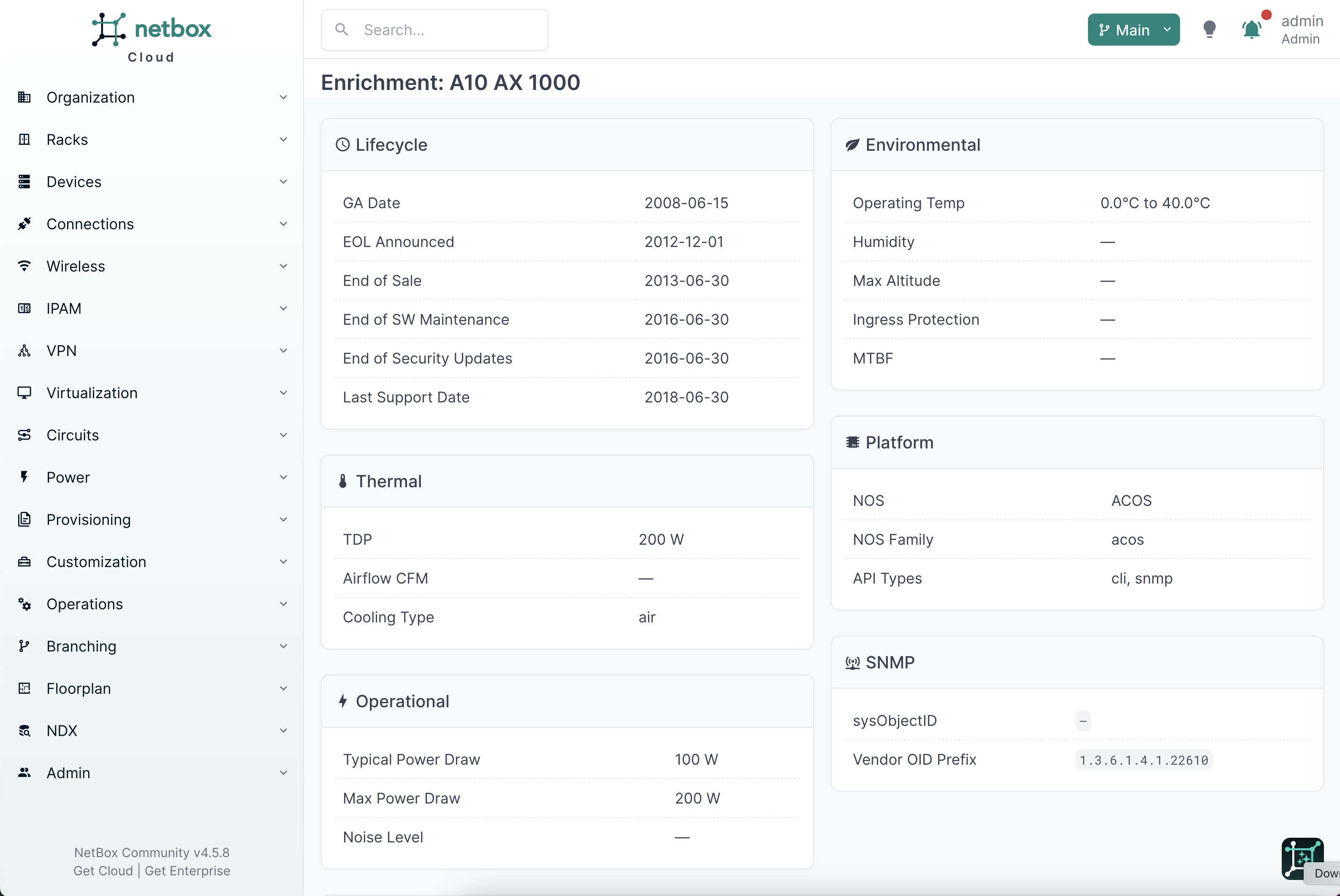
For the complete picture, click through to the dedicated NDX enrichment page. This page organizes all enrichment data by category:
- Lifecycle - general availability, end-of-sale, end-of-support, and end-of-life dates
- Thermal - thermal design power, airflow direction, cooling method, heat dissipation
- Environmental - operating temperature range, humidity range, altitude limits, MTBF
- Operational - typical and maximum power draw, noise levels, weight, rack units
- Platform - network operating system, supported API types, default credentials
- Protocol profiles - SNMP MIBs and OIDs, gNMI paths, NETCONF capabilities, Redfish endpoints, Modbus registers
Every data point includes provenance - the source URL where the data was obtained, a confidence score, and the date it was retrieved. Click any source link to verify the data against the original vendor documentation.
Free-tier enrichment indicators
Free plans show enrichment availability badges on device types in the catalog. These indicators show which categories of enrichment data exist for each type, making it easy to see the additional data available on paid plans.
Keeping Your Data Current
The NDX catalog is continuously updated as vendors release new hardware, publish updated specifications, and announce lifecycle milestones.
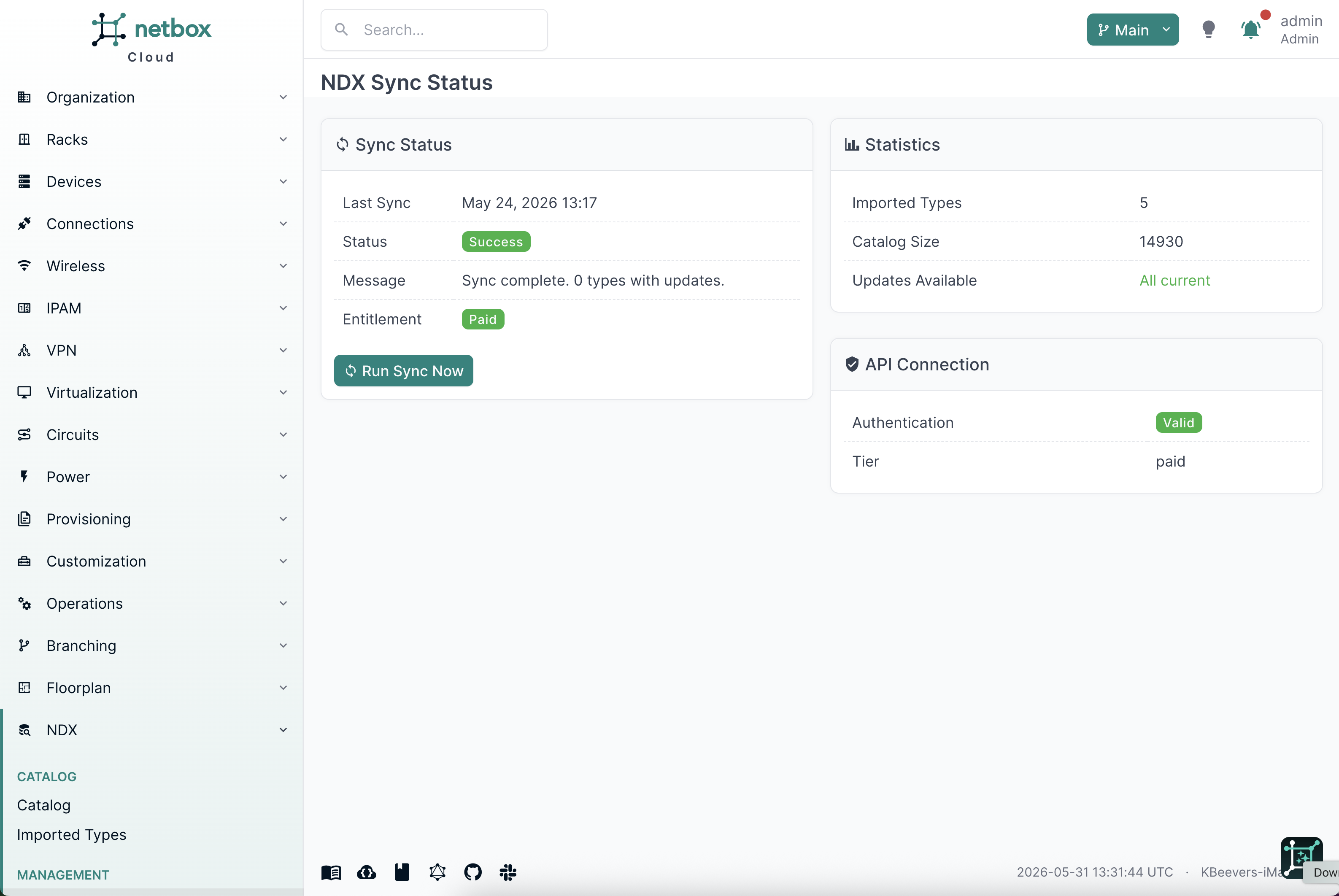
Automatic sync - NDX checks for catalog updates daily. New and updated device types are flagged automatically.
Sync Status page - Navigate to NDX > Sync Status to see what's changed since your last sync. The page shows:
- Sync statistics (new types available, updates available, last sync time)
- Available updates with details on what changed
- Manual sync trigger for on-demand updates
Updates are not auto-applied - when new data is available, NDX flags it but does not modify your existing device types. You choose when to review and apply updates, keeping you in control of what changes in your NetBox instance.
FAQ
What happens when I import a device type that already exists in my NetBox? NDX updates the existing device type with the latest catalog data. Component templates are merged - new components are added, existing components are updated, and no components are removed. Your local customizations to other fields are preserved.
Can I edit imported device types after import?
Yes. Imported device types are standard NetBox DeviceType objects. You can modify them like any other device type. If you later re-import the same type, NDX will update catalog-sourced fields while preserving your local changes to other fields.
What happens if I delete an imported device type from NetBox? The device type is removed from your NetBox instance as usual. It remains in the NDX catalog and can be re-imported at any time.
How do I upgrade from free to paid to get enrichment data? Contact the NetBox Labs team to upgrade your NetBox Cloud plan. Enrichment data becomes available immediately for all device types in the catalog. Re-import any previously imported types to pull in their enrichment data.
Does NDX work with NetBox Enterprise? NDX support for NetBox Enterprise is planned. Contact the NetBox Labs team for the latest availability.
Where can I learn more about NDX data coverage and methodology? Visit netboxlabs.com/ndx for details on data sourcing, vendor coverage, update frequency, and methodology.